A comprehensive guide to tuning memory limits, upload thresholds, and execution timeouts, as well as managing core extensions and performance accelerators for WordPress and modern PHP applications.
Runtime Configuration Architecture
Application stability and performance rely directly on how well PHP runtime parameters align with workload requirements. Rather than manually editing system-level php.ini configuration files via SSH, the control panel provides a centralized graphical interface to adjust runtime directives and toggle compiled modules with zero-downtime worker reloads.
Memory Limit
Prevents fatal out-of-memory errors during complex operations.
Upload Max Filesize
Accommodates large media files, archive imports, and theme packages.
Max Execution Time
Eliminates 504 gateway timeouts on long-running batch jobs.
Step 1: Accessing the PHP Runtime Configuration
Each installed PHP version operates within its own isolated pool. To modify runtime parameters for a specific version:
- Navigate to the PHP Multi-Engine section from the left navigation panel.
- Locate the target PHP runtime card (e.g., PHP 8.4 or PHP 8.3).
- Click the Configure button on the runtime card to launch the configuration modal.
Subversion & Security Patch Status:
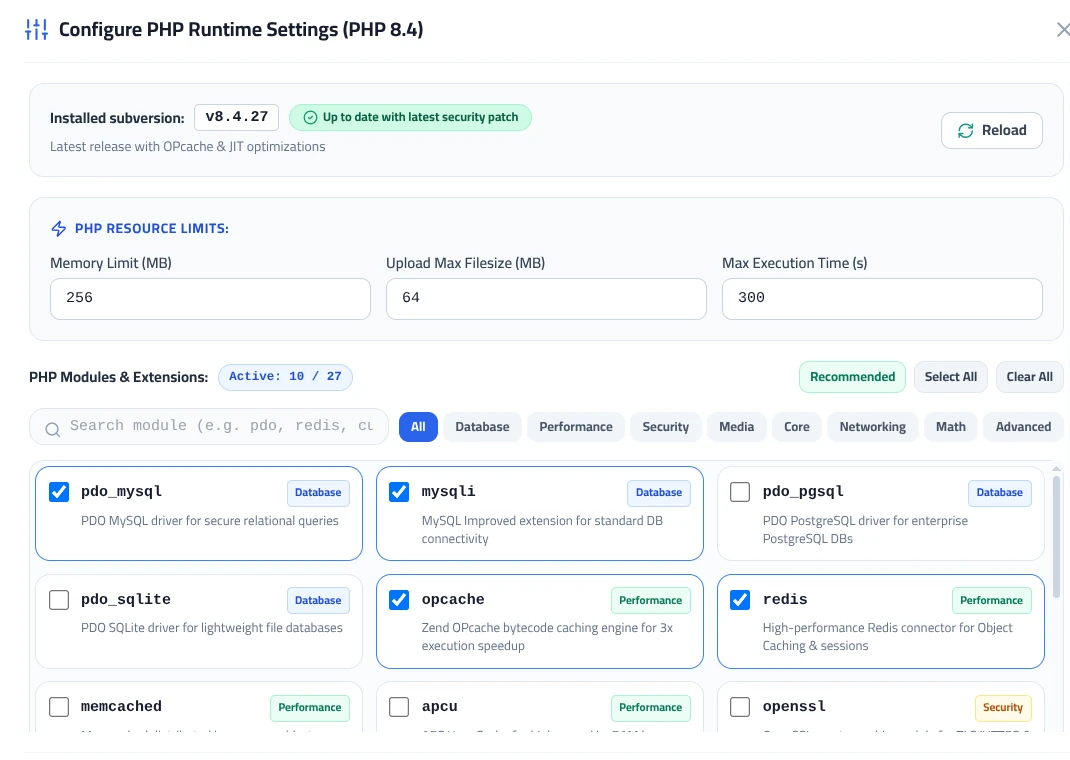
The configuration window displays the exact installed subversion build (e.g., v8.4.27) along with a green badge confirming that the runtime is fully up to date with the latest upstream security patches.
Step 2: Tuning Core PHP Resource Limits
Under the PHP Resource Limits section, three key numerical directives govern runtime script execution:
1. Memory Limit
Unit: MB
Defines the maximum RAM a single PHP process is allowed to allocate while serving a web request.
Default Value: 256 MB
Recommended Adjustment: Increase to 512 MB or 1024 MB for heavy e-commerce stores (WooCommerce), visual builders (Elementor/Divi), or reporting dashboards to eliminate the standard Fatal error: Allowed memory size of X bytes exhausted issue.
2. Upload Max Filesize
Unit: MB
Specifies the maximum size of an individual file permitted to be uploaded through HTTP post requests.
Default Value: 64 MB
Recommended Adjustment: Set to 128 MB or 256 MB if your users upload high-resolution media, ZIP plugin archives, or system backup dumps. This automatically syncs related input parameters like post_max_size.
3. Max Execution Time
Unit: Seconds
Sets the maximum duration in seconds that a script is allowed to run before being terminated by the server.
Default Value: 300 seconds (5 minutes)
Recommended Adjustment: A 300-second window provides sufficient headroom for large database migrations, automated backup generation, and external API feeds without causing premature script termination or 504 Gateway Timeout errors.
Step 3: Managing PHP Modules & Extensions
Under the PHP Modules & Extensions section, you can toggle compiled extensions on and off according to your application stack requirements.
Quick Management Tools:
- Active Extensions Badge: Displays real-time counts of enabled modules versus total available extensions (e.g.,
Active: 10 / 27). - Recommended Button: One-click preset that activates the standard production-grade extension bundle needed by WordPress, Laravel, and popular CMS frameworks.
- Select All / Clear All: Batch controls for bulk enabling or disabling modules during custom staging tests.
- Category Filters: Fast filter pills to isolate modules by category (
Database,Performance,Security,Media,Core,Networking).
| Category | Key Extensions | Purpose & Benefit |
|---|---|---|
| Performance | opcache, redis, memcached | Accelerates script execution up to 3x via Zend bytecode caching (opcache) and provides in-memory session and query caching (redis). |
| Media | imagick, gd, exif | Handles image processing, thumbnail creation, and next-generation image encoding (WebP, AVIF) with EXIF metadata parsing. |
| Database | mysqli, pdo_mysql, pdo_sqlite | Provides secure database abstraction layers, prepared statements, and persistent pooling connections for MySQL and MariaDB. |
| Security | openssl, sodium, ioncube | Handles cryptographic operations, modern Argon2id password hashing, and encrypted commercial script decoding (ioncube). |
| Core & Text | mbstring, intl, curl, zip | Essential for multibyte UTF-8 international text processing, localization standards, REST API communication, and ZIP file extraction. |
Step 4: Applying Changes with Zero-Downtime Reload
Once you have adjusted the resource limits and checked your desired extensions:
- Click the Save Changes button at the bottom of the modal, or click the Reload button located in the top banner.
- The control panel signals the master PHP-FPM process to trigger a graceful reload of all worker pools.
Zero-Downtime Worker Reload:
A graceful reload ensures that all active client requests finish processing undisturbed. Newly spawned PHP-FPM worker processes pick up the modified configuration instantly without dropping live connections or causing HTTP 502/503 bad gateway errors.
Recommended Limit Baselines by Workload
Use the following reference guidelines to balance memory consumption and processing capability:
| Site / Application Type | Memory Limit | Upload Max | Execution Time | Essential Modules |
|---|---|---|---|---|
| Standard Blogs & Corporate Portals | 128MB – 256MB | 32MB – 64MB | 60s – 120s | opcache, mbstring, gd |
| E-Commerce & High-Traffic Stores (WooCommerce) | 512MB | 128MB – 256MB | 300s | opcache, redis, imagick, intl |
| Learning Portals, Memberships & Custom APIs | 512MB – 1024MB | 256MB – 512MB | 300s – 600s | opcache, redis, sodium, bcmath |