A step-by-step guide to provisioning hosting packages in MASACP, defining hardware boundaries (CPU, RAM, Disk, and Inodes), managing account quotas, and distributing direct registration links.
The Role of Hosting Packages in Multi-Tenant Environments
In shared web hosting, hosting packages serve as the operational blueprint for new customer accounts. Rather than manually configuring storage quotas, database counts, and CPU limits for every virtual host, administrators define standardized hosting packages that automate provisioning and maintain resource parity across tenants.
MASACP links each package directly to Linux kernel accounting groups and filesystem quotas. When an account is provisioned under a specific plan, the control panel enforces physical resource boundaries while providing automated billing registration URLs for seamless customer onboarding.
Step-by-Step: Creating a New Hosting Plan
To create a new hosting tier, navigate to the Hosting Plans section from the main sidebar and click the + Create New Hosting Plan button.
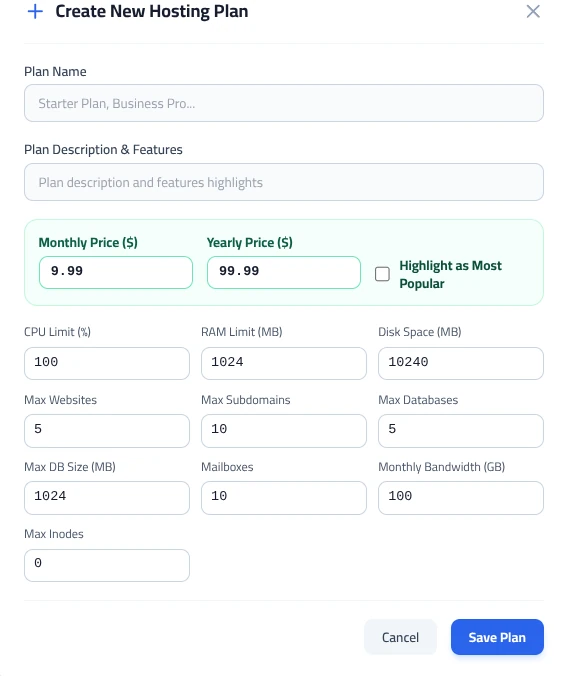
1. Metadata & Pricing Configuration
- Plan Name: Specify a clear commercial name (e.g., Starter Plan, Business Pro, or WordPress VIP).
- Plan Description & Features: Enter a concise summary of the plan’s highlights to help clients evaluate its specifications.
- Monthly Price ($) & Yearly Price ($): Define your recurring billing rates for monthly and discounted annual terms.
- Highlight as Most Popular: Flagging this checkbox adds a distinctive visual badge to the plan when displayed on public checkout pages.
2. Compute & Hardware Isolation Limits
These thresholds directly instruct the Linux kernel Cgroups engine on the maximum compute slice allocated to the tenant:
Allocates CPU processing time relative to core capacity. For example, 100% represents one full virtual CPU core equivalent, while 200% grants up to two full cores during peak execution.
Defines the maximum resident set memory allowed for the user’s PHP workers and application threads (e.g., 1024 MB for entry tiers; 2048 MB or 4096 MB for heavy e-commerce stores).
Enforces hard filesystem storage quotas on the tenant document root and mail directories (e.g., 10240 MB for 10 GB).
3. Application Quotas & File Boundaries
| Configuration Field | Example Setting | Operational Function |
|---|---|---|
| Max Websites / Subdomains | 5 / 10 | Limits the total number of top-level domains and virtual subdomains the account can host. |
| Max Databases / Max DB Size | 5 / 1024 MB | Restricts the quantity of MariaDB/MySQL databases and the maximum storage threshold for each database. |
| Mailboxes | 10 | Cap on individual IMAP/POP3 email mailboxes created under the account domains. |
| Monthly Bandwidth (GB) | 100 GB | Sets the aggregate egress data transfer threshold per monthly billing cycle. |
| Max Inodes | 0 (or 250,000) | Limits the total number of individual files and folders. Setting 0 allows unlimited inodes, while entering a number prevents storage inode exhaustion caused by rogue caching plugins. |
After defining all resource limits, click Save Plan to register the new configuration package.
Plan Overview & Direct Registration Links
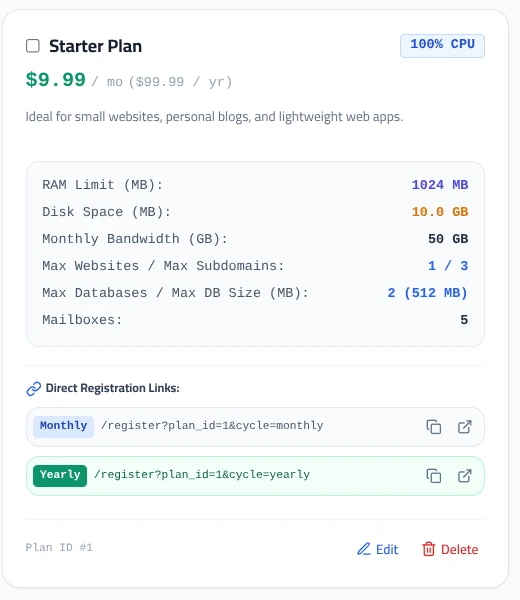
Once created, hosting plans appear as structured cards displaying pricing, compute allocations, storage limits, and direct onboarding URLs.
Distributing Direct Registration Links
MASACP automatically generates pre-configured customer sign-up endpoints for both billing frequencies:
/register?plan_id=1&cycle=monthly
Directs new users to the sign-up form with the Starter Plan and monthly billing cadence automatically preselected.
/register?plan_id=1&cycle=yearly
Preselects annual billing at the discounted yearly rate ($99.99/yr), reducing friction during customer checkout.
Each link includes dedicated action buttons to Copy to Clipboard for placement in landing pages or Open in New Tab for direct verification.
Provisioning Best Practices
1. Always Enforce Inode Quotas on Shared Tiers: While a user might consume only 2 GB of their 10 GB disk allowance, an unmaintained WordPress caching or logging plugin can generate hundreds of thousands of tiny files. Setting an Inode quota (e.g., 200,000 to 300,000 files) preserves filesystem performance and prevents disk indexing bottlenecks.
2. Align RAM with PHP Memory Allocations: Ensure that the RAM Limit configured for the plan exceeds the cumulative memory of concurrent PHP-FPM workers. If an application runs 4 PHP workers with memory_limit = 256M, setting a plan RAM limit below 1024 MB may trigger Out-Of-Memory (OOM) worker terminations during traffic peaks.
3. Dynamic Plan Re-allocation: Modifying a plan’s parameters updates the template for future accounts. Existing accounts can have their individual limits scaled dynamically via the account settings without requiring service restarts or data migrations.