Learn how to manage, audit, and update WordPress plugins and themes centrally from MASACP without opening the WordPress dashboard. Discover one-click bulk updating, automated child theme generation, and safe code editing.
Managing plugins and themes directly from the server level eliminates memory limits and timeouts often experienced inside the WordPress web admin, ensuring zero-downtime batch updates and seamless theme customization.
1
Global Management Controls
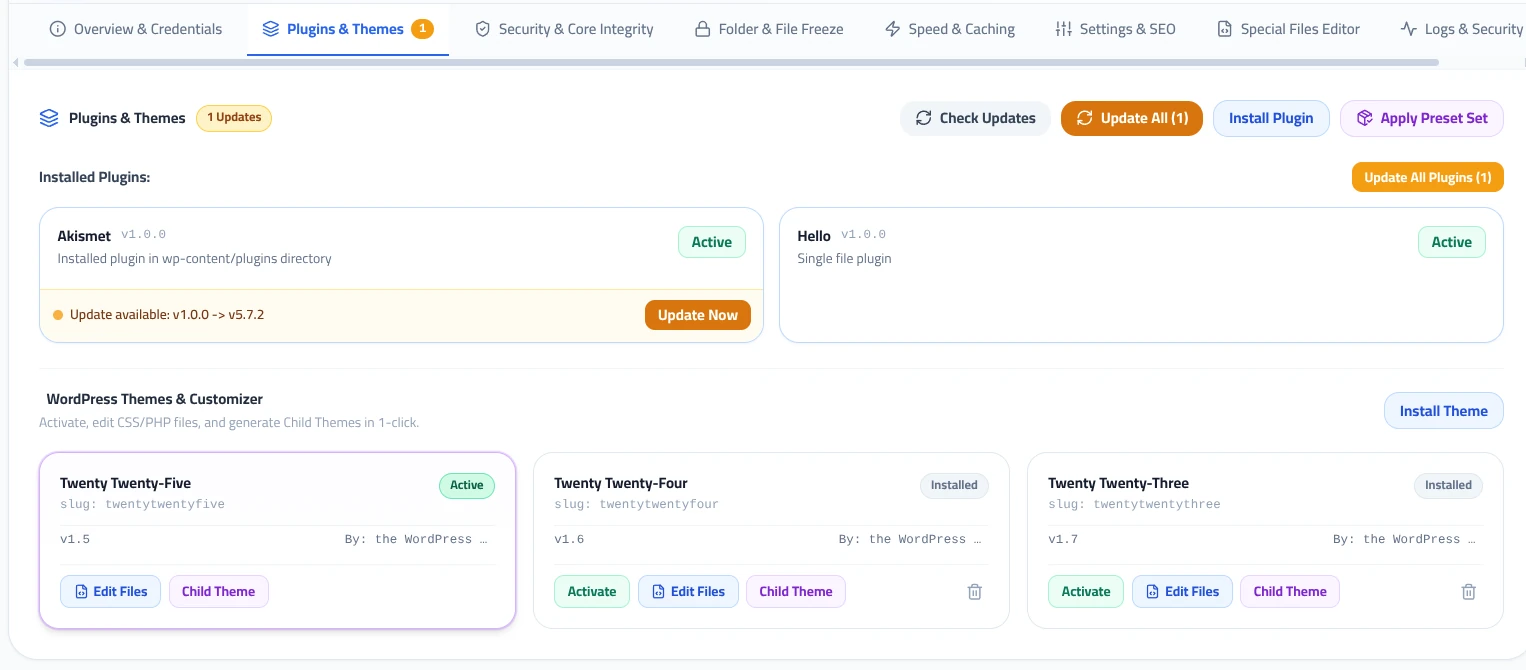
At the top of the Plugins & Themes tab, four primary action controls allow you to inspect and manage all installed assets across your website:
Check Updates
Queries the official WordPress repository in real time to detect pending security patches and new versions for all installed plugins and themes.
Update All
Executes a one-click automated update sequence for all outdated plugins and themes in the background with zero timeout risks.
Install Plugin
Search the WordPress.org plugin directory directly from the panel or upload custom ZIP packages without accessing wp-admin.
Apply Preset Set
Deploy pre-configured bundles of essential plugins (such as SEO, Security, or E-Commerce sets) across multiple sites instantly.
2
Managing Installed Plugins
The Installed Plugins section displays all extensions currently residing in your site’s directory, categorized by status:
- Active Status: Plugins currently loaded by WordPress display an active status badge. Inactive plugins can be toggled without deleting files.
- Update Availability Alerts: When a newer version is released, the card displays an alert showing the current installed version and the target release.
- Granular Updates: Click Update Now on individual plugins to update them selectively, or use the Update All Plugins button to batch-update the entire directory.
3
Themes & Child Theme Generator
The WordPress Themes & Customizer section provides full control over your active and standby templates:
Theme Activation
Switch the active theme with a single click. Standby installed themes are visible alongside author details and version numbers.
Child Theme Generator
Generate and link a standardized Child Theme in one click. All custom CSS and PHP hooks are safely preserved when the parent theme receives future updates.
Direct File Editor
Click Edit Files to launch the built-in code editor directly targeting functions.php or style.css without needing external FTP clients.
Modifying code directly inside a parent theme is dangerous because any official theme update will overwrite your customizations. The MASACP Child Theme Generator automatically creates the proper directory structure, links the stylesheet header, and activates the child theme with zero manual coding.
Best Practices for Asset Updates
Before running Update All on a production e-commerce or high-traffic website, use the Staging / Clone tool to test compatibility in a cloned sandbox environment first.
Unused themes and deactivated plugins can harbor dormant vulnerabilities. Use the trash icon on inactive theme cards to permanently purge unused files from the server.