A comprehensive technical guide to accessing and utilizing the MASACP CLI utility. Learn how to perform out-of-band administration, execute emergency password resets, lift IP bans, heal broken website virtual hosts, and manage core services directly from the terminal console.
1. Overview of the MASACP CLI Console
The MASACP CLI (Command-Line Interface) is an autonomous, out-of-band management and disaster recovery tool built directly into the operating system. Even if the web control panel interface becomes inaccessible due to firewall misconfigurations, expired SSL certificates, forgotten credentials, or service failures, the CLI ensures that system administrators retain complete operational control over the server.
Key Operational Benefits
- Direct SQLite database manipulation for immediate administrative recovery without external dependencies.
- One-touch restoration of locked administrator accounts, two-factor authentication (2FA), and domain binding limits.
- Automated self-healing diagnostics for Nginx virtual hosts, POSIX filesystem permissions, and PHP-FPM pools.
- Full support for both an interactive terminal menu and non-interactive shell command-line flags.
2. Connecting to the Server CLI
To launch the MASACP CLI rescue tool, you must establish an administrative SSH connection to your server with root privileges. You can access the terminal through three primary methods:
Option A: PuTTY (Windows)
PuTTY is a standard, lightweight SSH client for Windows systems. It enables secure shell connections to remote Linux servers.
Option B: Native Terminal
Available natively on macOS, Linux distributions, and modern Windows PowerShell or Windows Terminal without third-party installations.
Replace YOUR_SERVER_IP with your VPS address
Option C: In-Panel Terminal
If the web interface is currently functioning, open the built-in Terminal module located inside your MASACP control panel sidebar.
Web-based WebSocket terminal
3. Launching the MASACP Rescue Console
Once connected via SSH as root, enter the primary CLI command to initiate the interactive console:
System Command
The command utility will render the MASACP ASCII banner along with the interactive menu containing options numbered 0 through 17.
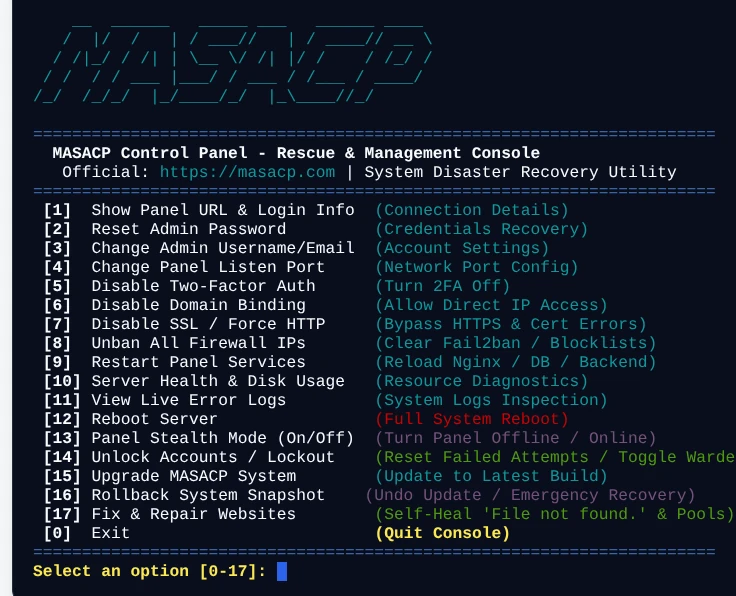
4. Detailed Breakdown of CLI Menu Options (0 to 17)
Each menu entry addresses a specific operational requirement. Enter the corresponding numeral when prompted by Select an option [0-17]: and press Enter.
[1] Show Panel URL & Login Info
Connection Details
Queries the primary database and network stack to inspect active connectivity parameters. It outputs the Primary Domain URL, Direct IP Access URL, current listen port, SSL protocol status (HTTPS or HTTP), administrator username, administrator email, and Two-Factor Authentication status.
[2] Reset Admin Password
Credentials Recovery
Provides an emergency password override when web login credentials are lost or compromised. The utility prompts for a new password with confirmation, securely hashes the entry using OWASP-compliant bcrypt (12 rounds) with individual cryptographic salt, updates the database, clears failed login counters, and removes any active account lockouts.
[3] Change Admin Username/Email
Account Settings
Updates the administrator login username and primary notification email address. This is helpful when migrating account ownership or updating recovery email addresses without logging into the graphical dashboard.
[4] Change Panel Listen Port
Network Port Config
Modifies the TCP listening port of the control panel (default is 8443). The script updates the internal configuration, rewrites the Nginx virtual host at /etc/nginx/sites-available/masacp.conf, automatically opens the newly selected port across active firewall daemons (UFW and firewalld), and reloads Nginx seamlessly.
[5] Disable Two-Factor Auth
Bypass Lockout
Immediately deactivates Two-Factor Authentication (2FA / TOTP) across all administrator accounts and clears stored shared secrets. Use this option when an administrator loses access to their authenticator device or backup codes.
[6] Disable Domain Binding
Direct IP Access
Removes strict hostname binding restrictions. If the panel was bound to a domain name whose DNS has expired, mispropagated, or failed, this action resets the binding to allow direct administrative login via the server’s public IP address (https://SERVER_IP:PORT).
[7] Disable SSL / Force HTTP
Bypass HTTPS
Temporarily turns off mandatory HTTPS redirection and downgrades panel access to plain HTTP. This bypasses fatal browser SSL handshakes caused by expired, revoked, or corrupted Let’s Encrypt certificates, permitting emergency administrative access.
[8] Unban All Firewall IPs
Firewall Flush
Unbans all temporarily or permanently blocked IP addresses. The utility instructs Fail2ban to unban all jails (fail2ban-client unban --all), empties the panel Login Warden IP blocklist table (banned_ips), and flushes corresponding iptables firewall drop rules.
[9] Restart Panel Services
Service Management
Performs a clean restart across all critical infrastructure daemons, including masacp backend service, Nginx, OpenResty, MariaDB / MySQL, and all installed PHP-FPM pools (PHP 8.2, 8.3, 8.5). On resource-constrained VPS environments, it automatically provisions a 2 GB swap file to prevent out-of-memory (OOM) crashes.
[10] Server Health & Disk Usage
Diagnostics
Outputs real-time operational diagnostics: root partition disk storage usage (Total, Used, Free, Percentage), detailed memory breakdown (Total RAM vs. Available RAM from /proc/meminfo), and CPU load averages over 1, 5, and 15-minute intervals.
[11] View Live Error Logs
Troubleshooting
Inspects and prints the last 50 lines of active system and web server error logs, reading directly from /opt/masacp/logs/error.log, /var/log/masacp/error.log, and /var/log/nginx/error.log.
[12] Reboot Server
System Reboot
Initiates a complete server reboot sequence with safety confirmation (y/n). Use this command when kernel updates, hardware driver adjustments, or deep system freezes require an operating system reset.
[13] Panel Stealth Mode (On/Off)
Air-Gapped Security
Toggles the control panel web interface between Online and Offline (Stealth Mode). When stealth mode is activated, the MASACP daemon is stopped and its listening port is completely closed, creating an air-gapped environment. Hosted websites, Nginx, PHP pools, MySQL databases, and mail services continue running at 100% capacity with zero interruption.
[14] Unlock Accounts / Lockout
Account Warden
Manages the brute-force security engine and locked user accounts. Includes four sub-actions: unlock a specific user account, unlock all user accounts simultaneously, disable the login lockout engine completely, or re-enable the Warden engine with customized threshold limits.
[15] Upgrade MASACP System
System Upgrade
Automates the update process directly from the official Authority distribution portal. Creates a protective pre-upgrade safety snapshot, performs strict SHA-256 cryptographic checksum verification to prevent Man-in-the-Middle tampering, uses Anti-ZipSlip sandboxed extraction, synchronizes web assets, and verifies daemon health.
[16] Rollback System Snapshot
Disaster Recovery
Scans local snapshot repositories (/opt/masacp/data/snapshots/), displays an interactive menu of saved working system states with timestamps and file sizes, and safely reverts the core binaries, frontend assets, and database to the selected restore point.
[17] Fix & Repair Websites
Self-Healing Engine
An automated repair engine designed to resolve website rendering errors. It fixes FastCGI “File not found.” errors, restores 0755 and 0750 directory traversal permissions across /var/www/, enforces tenant POSIX ownership isolation, generates missing PHP-FPM pools, verifies socket directories, and regenerates missing default index files.
[0] Exit
Quit Console
Safely closes the interactive CLI management console and returns your terminal session to the native Linux bash shell prompt.
5. Non-Interactive CLI Quick Shortcuts
For automated maintenance scripts, cron jobs, or rapid terminal administration without navigating the interactive menu, execute commands directly as arguments to masacp:
| Shell Command | Target Action | Primary Use Case |
|---|---|---|
| masacp info | Show panel URL, port, and admin info | Checking active port and admin username |
| masacp password | Reset administrator password | Emergency credentials reset |
| masacp 2fa | Disable Two-Factor Authentication | Lost authenticator phone or device |
| masacp unban | Unban all blocked IPs & clear Fail2ban | Administrator locked out by firewall |
| masacp unlock [user] | Unlock specific user account | Resetting brute-force lockout counters |
| masacp unlock-all | Unlock all accounts & clear login bans | System-wide lockout restoration |
| masacp domain | Disable domain restriction | Accessing panel directly via IP address |
| masacp ssl | Disable SSL and force plain HTTP | Bypassing fatal SSL certificate errors |
| masacp restart | Restart all stack services | Reloading Nginx, MariaDB, and PHP pools |
| masacp fix-sites | Self-heal & repair all websites | Resolving FastCGI ‘File not found.’ and 502 errors |
| masacp update | Upgrade MASACP system | Pulling verified updates from Authority Portal |
| masacp rollback | Rollback to previous snapshot | Immediate recovery from failed updates |
| masacp stealth off | Activate air-gapped stealth mode | Closing panel ports while keeping sites live |
| masacp stealth on | Deactivate stealth mode (Online) | Restoring panel access on port 8443 |
6. Common Emergency Recovery Scenarios
Scenario A: Locked Out Due to Too Many Failed Logins
If the Login Warden or Fail2ban has blocked your office or home IP address due to multiple incorrect attempts:
- ssh root@YOUR_SERVER_IP
- masacp unban
- masacp unlock-all
This unbans your IP in both Fail2ban and iptables, flushes the database blocklist, and resets failed login counters to 0.
Scenario B: Websites Throwing “File not found.” or 502 Bad Gateway
If web directories suffered ownership permission corruption or PHP-FPM pools failed to spawn after migrations or updates:
- ssh root@YOUR_SERVER_IP
- masacp fix-sites
The automated engine scans every hosted domain, re-establishes 0755 directory traversal permissions, configures isolated PHP pools, and reloads Nginx.
Scenario C: Lost 2FA Phone or Broken SSL Certificate
If you cannot access the panel because your authenticator app is missing or browser SSL handshakes fail:
- masacp 2fa
- masacp ssl
- masacp domain
This immediately disables 2FA, allows plain HTTP access on http://SERVER_IP:8443, and removes any broken domain redirects.