Discover how to achieve sub-50ms TTFB response times and handle massive traffic spikes using the MASACP Multi-Layer Acceleration Suite. Explore Full-Page Caching, Redis Object Caching, WooCommerce bypass rules, automated smart purges, and server capacity stress testing.
Unlike traditional WordPress caching plugins that execute inside PHP, MASACP operates caching directly at the web server and kernel RAM layers (Nginx / Varnish / Redis). This offloads server CPU by over 90% and guarantees lightning-fast loading speeds for both visitors and search engine crawlers.
1
The Three Core Acceleration Layers
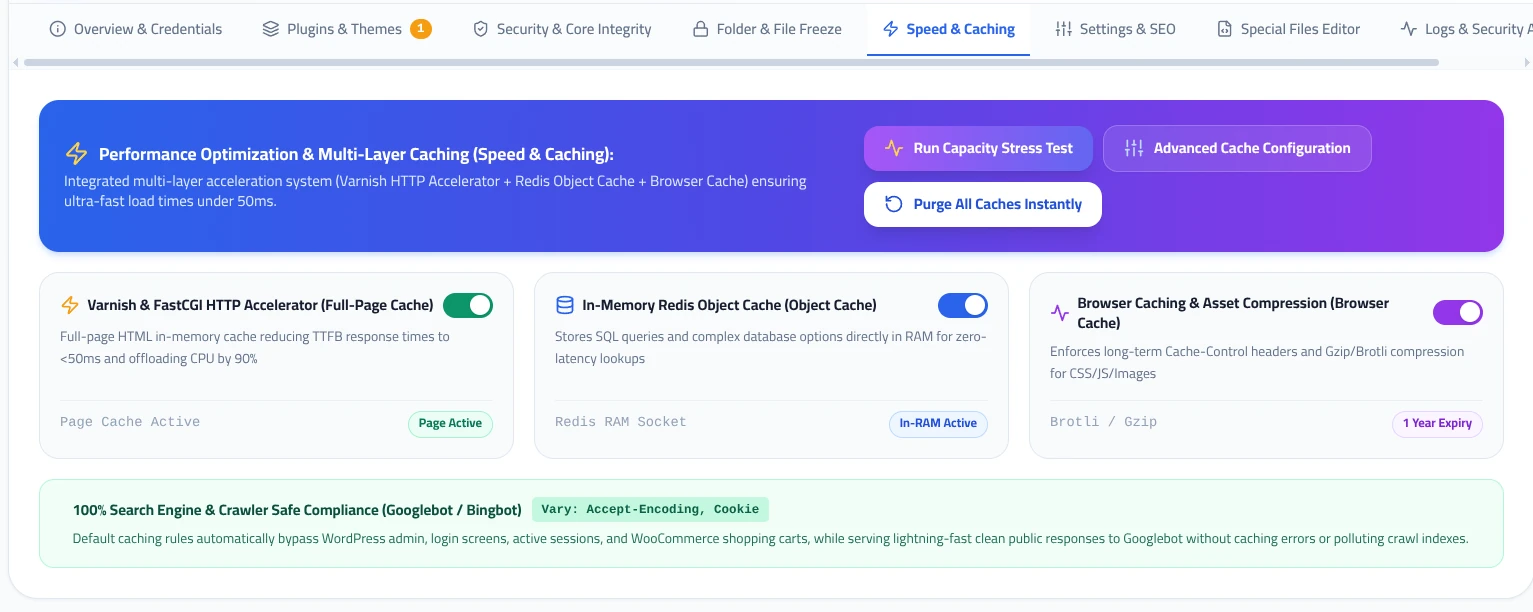
In the Speed & Caching tab, you can toggle three independent layers of server acceleration:
Varnish & FastCGI HTTP Accelerator
Page Active
Stores rendered HTML pages in RAM memory. When a visitor requests a page, the web server delivers it in under 50 milliseconds without initiating a single PHP process or MySQL query.
In-Memory Redis Object Cache
In-RAM Active
Maintains database queries, WordPress transients, and site options directly inside high-speed RAM via a local socket, eliminating repetitive SQL load.
Browser Caching & Compression
1 Year Expiry
Enforces strict HTTP Cache-Control headers alongside high-ratio Brotli and Gzip compression for static CSS, JavaScript, WebP, and fonts according to Google Core Web Vitals standards.
2
Instant Cache Purging & Stress Testing
In the banner at the top of the Speed & Caching interface, you can trigger real-time actions:
Purge All Caches Instantly
Flushes all three tiers simultaneously (Full-Page Cache, Redis memory keys, and VHost proxy caches). Use this immediately after deploying design overhauls or critical content updates.
Run Capacity Stress Test
Launches an automated load testing benchmark against your site, simulating concurrent user requests to measure real-world requests per second (RPS) and latency curves.
3
Cache TTL & Multi-Tenant Redis Isolation
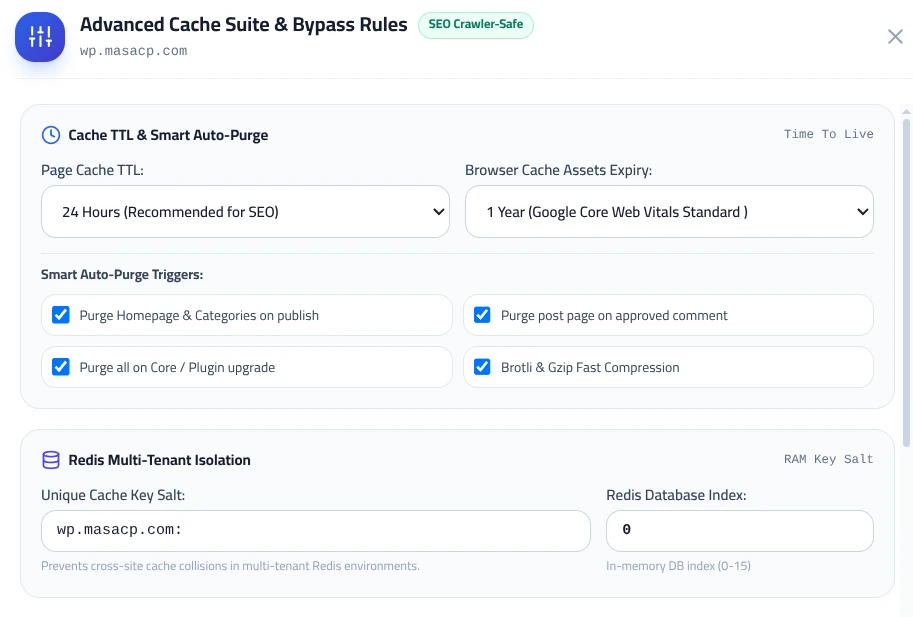
Clicking the Advanced Cache Configuration button opens the granular cache optimization suite:
- Page Cache TTL: Configurable Time-To-Live (defaults to 24 Hours, optimized for maximum SEO ranking and minimal origin load).
- Browser Cache Expiry: Defaults to 1 Year to satisfy Google PageSpeed Insights and Core Web Vitals criteria.
- Smart Auto-Purge Triggers:
- • Purge Homepage & Categories when publishing new posts.
- • Purge specific post pages automatically upon approved user comments.
- • Auto-purge all caches whenever WordPress core, plugins, or themes are updated.
- Redis Multi-Tenant Isolation: Assigns an isolated salt key and database index (0 to 15) to completely prevent cache collisions between different WordPress sites sharing the same Redis instance.
4
E-Commerce Bypass Rules & Ad Campaign Optimization
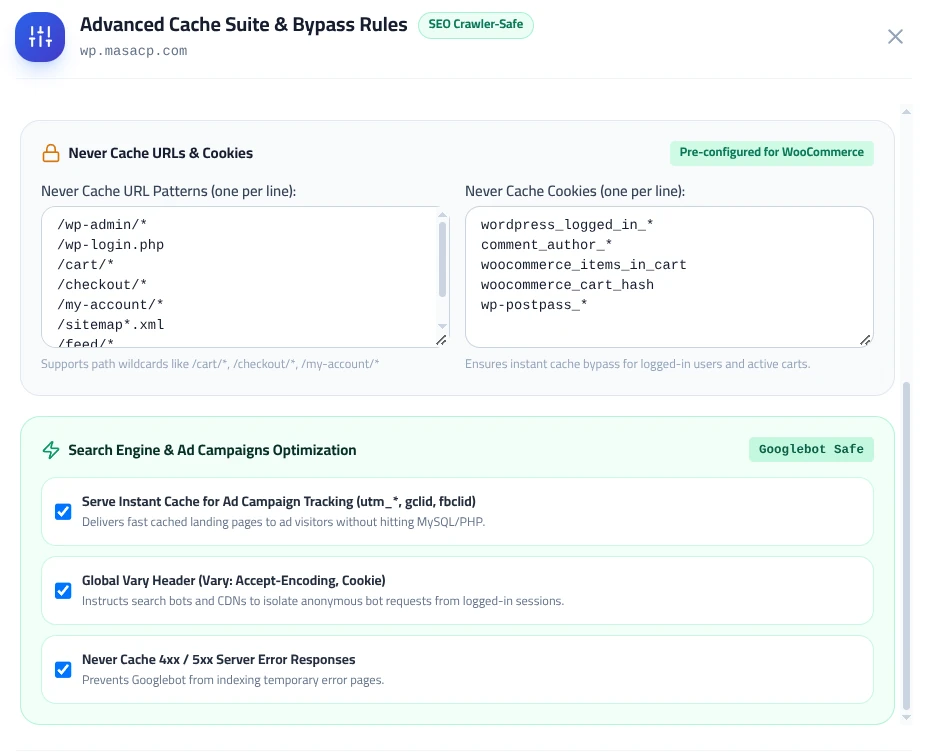
In the lower section of the Advanced Cache Suite, MASACP applies enterprise-level bypass logic:
Pre-configured WooCommerce Rules
Safe Bypass
Dynamic store pages and shopping sessions are automatically exempted from static caching:
- /wp-admin/* and /wp-login.php
- /cart/* and /checkout/*
- /my-account/* and /sitemap*.xml
- Session cookies: woocommerce_items_in_cart, wordpress_logged_in_*
Search Engine & Ad Campaign Tracking
Googlebot Safe
Ensures high conversion rates and clean analytics indexing:
- Instant Ad Cache: Serves cached landing pages to paid traffic containing query strings (
utm_*,gclid,fbclid) without hitting PHP or MySQL. - Global Vary Header: Enforces
Vary: Accept-Encoding, Cookieto keep logged-in content strictly isolated from search bots. - Never Cache Errors: Blocks temporary 4xx/5xx HTTP errors from entering cache to prevent Googlebot from indexing error screens.
Best Practices for Maximum Speed
When Full-Page Cache and Redis Object Cache are active in MASACP, avoid running third-party WordPress caching plugins (such as WP Super Cache or W3 Total Cache) as they duplicate caching efforts inside PHP and degrade performance.
You can confirm active caching by inspecting your browser Developer Tools (Network tab → Response Headers): check for
X-Cache: HIT or X-FastCGI-Cache: HIT indicating instant server-side delivery.