A comprehensive guide to configuring Coraza Web Application Firewall, fine-tuning OWASP CRS v4 Paranoia Levels, managing anomaly score thresholds, enabling core threat shields, and managing inspection whitelists.
Enterprise Application Shielding
Web applications face persistent automated exploitation attempts, ranging from SQL injections and remote code execution to scanner recon. The control panel integrates Coraza WAF, a high-performance, enterprise-grade Web Application Firewall engine running the industry-standard OWASP Core Rule Set (CRS v4.0).
Unlike legacy signature matchers that block requests indiscriminately, Coraza utilizes a cumulative anomaly scoring architecture that inspects full HTTP transaction payloads with minimal latency and high accuracy.
1. Security Dashboard & WAF Telemetry
To manage web application firewall policies, navigate to Security & WAF from the main navigation sidebar. The top overview banner displays real-time operational metrics across all virtual hosts:
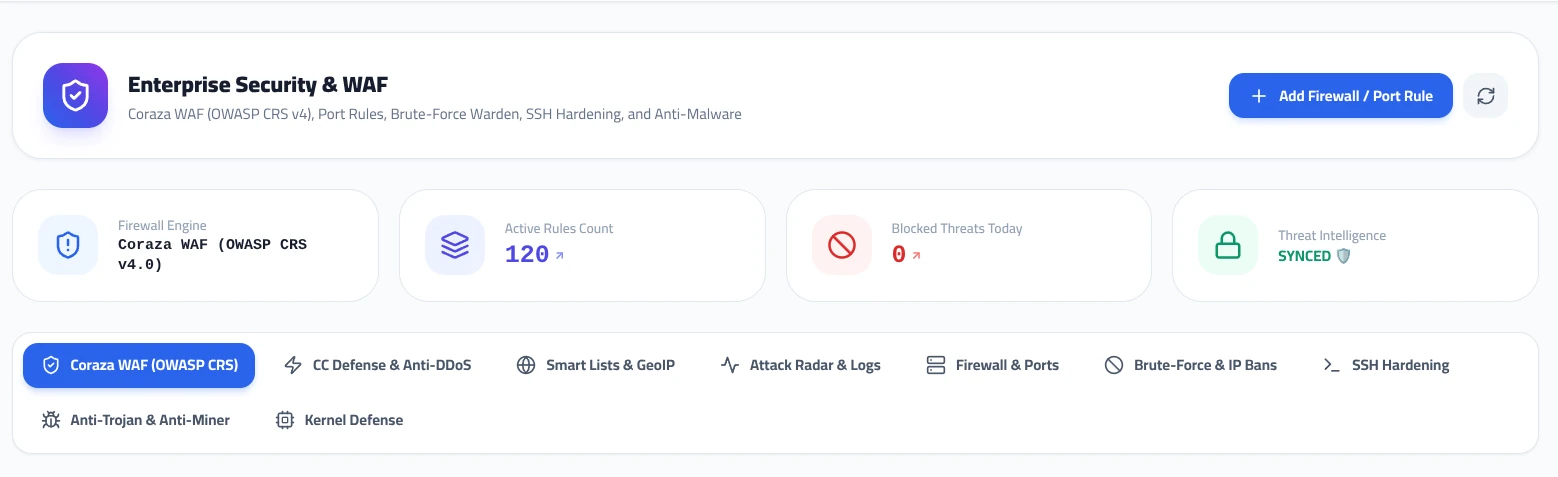
Coraza WAF (OWASP CRS v4.0)
120 Active
Live Counter
SYNCED
2. Configuring OWASP CRS Paranoia Levels (PL)
Under the Coraza WAF (OWASP CRS) tab, administrators can select the engine’s Paranoia Level. Paranoia Levels control the depth and strictness of traffic inspection:
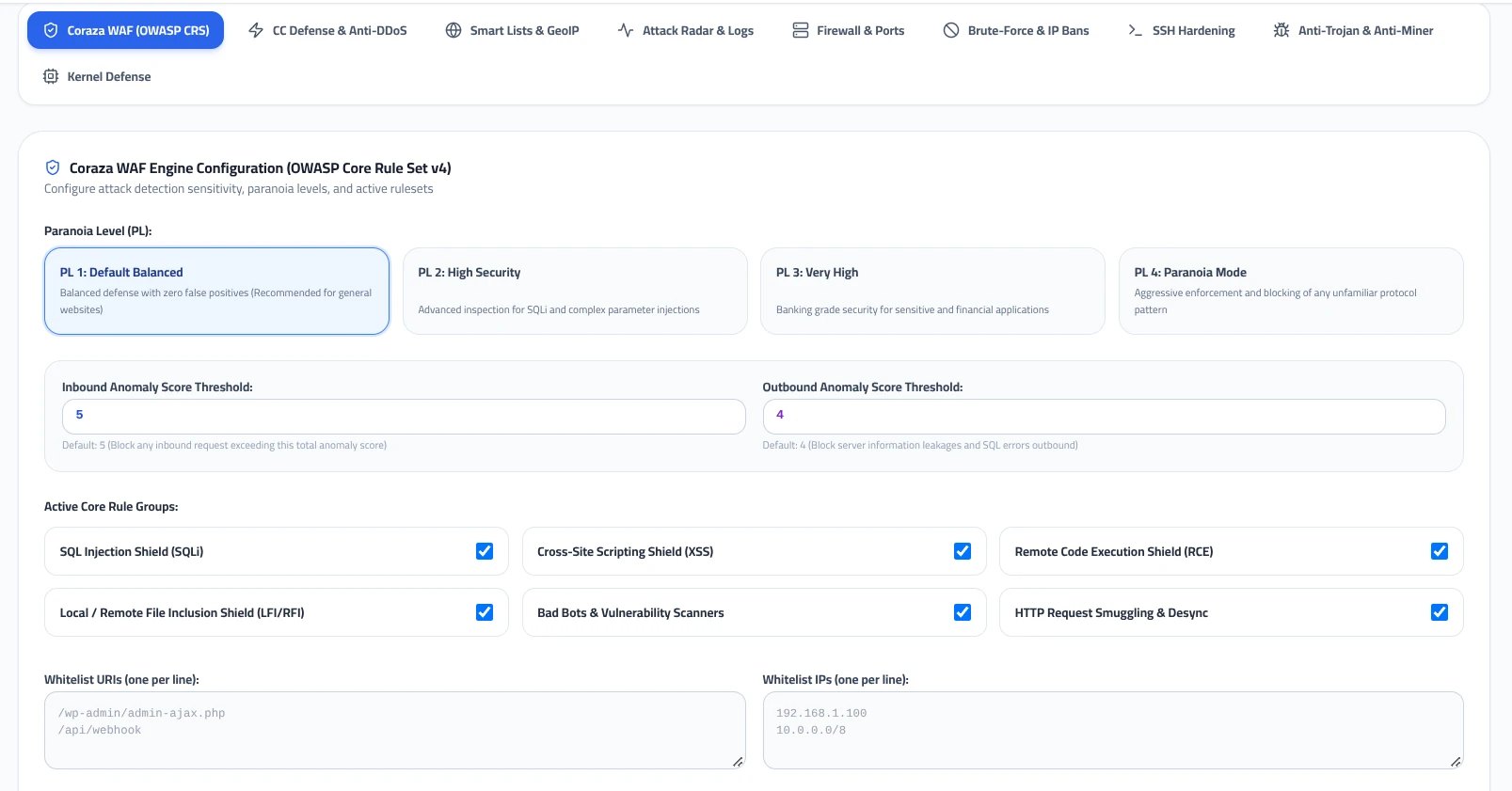
PL 1: Default Balanced (Recommended)
Standard Baseline
Provides balanced defense against common exploits with virtually zero false positives. Engineered for standard production websites, WordPress instances, e-commerce stores, and general web applications.
PL 2: High Security
Advanced Inspection
Enforces stricter parameter validation, advanced regular expression checks for SQLi obfuscation, and deeper inspection of request headers. Recommended for applications processing sensitive user data.
PL 3: Very High
Financial / Banking
Banking-grade inspection that flags non-standard character encodings and unusual input structures. May require custom whitelisting for third-party plugins.
PL 4: Paranoia Mode
Strict Zero-Trust
Extremely aggressive enforcement. Rejects any request departing from rigid HTTP protocol specifications. Suited for high-security APIs and air-gapped web portals.
3. Anomaly Score Thresholds
OWASP CRS v4 employs a collaborative anomaly scoring model. Rather than blocking on a single rule match, each matched rule contributes an anomaly score (critical matches add 5 points, warning matches add 2-3 points). When the cumulative score reaches the configured threshold, the request is blocked with an HTTP 403 Forbidden response.
Inbound Anomaly Score Threshold: 5
Evaluates incoming client request headers, cookies, query strings, and POST bodies. A threshold of 5 ensures that any single critical exploit attempt (such as standard SQL injection) is blocked immediately.
Default: 5 (Recommended)
Outbound Anomaly Score Threshold: 4
Monitors HTTP responses leaving the server to prevent data leakage, database error string exposure (e.g., MySQL error traces), and unauthorized server fingerprinting.
Default: 4 (Recommended)
4. Active Core Rule Groups & Attack Shields
Coraza WAF provides modular rule group toggles. Administrators can enable or disable specific protection categories based on their application stack:
SQL Injection Shield (SQLi)
Inspects inputs for UNION statements, comment injection, and unauthorized SQL query manipulation.
Cross-Site Scripting Shield (XSS)
Detects malicious script tag injections, attribute handlers, and encoded DOM payloads.
Remote Code Execution Shield (RCE)
Blocks shell command execution patterns, reverse shell attempts, and system binary invocations.
Local / Remote File Inclusion Shield (LFI/RFI)
Prevents directory traversal attacks (../etc/passwd) and remote script inclusion.
Bad Bots & Vulnerability Scanners
Recognizes malicious user-agents, automated vulnerability scanners (Nikto, Acunetix, Sqlmap), and spam bots.
HTTP Request Smuggling & Desync
Prevents reverse proxy desync attacks targeting chunked transfer headers and content-length discrepancies.
5. URI and IP Whitelisting Strategies
Legitimate administrative tasks, third-party payment gateways, or webhooks may occasionally trigger WAF rules due to complex payloads. Rather than lowering the global Paranoia Level, administrators can specify targeted exemptions:
Whitelist URIs (one per line):
Paths specified here bypass deep inspection, allowing complex JSON payloads or admin AJAX requests:
/wp-admin/admin-ajax.php
/api/webhook
Whitelist IPs (one per line):
Trusted internal networks, office IPs, or monitoring servers that should bypass all WAF inspection:
192.168.1.100
10.0.0.0/8
Click Save Changes at the bottom of the page to compile and apply the rules. The Coraza engine will reload instantaneously without dropping active connections.
Operational Best Practices
- • Keep the default PL 1 (Balanced) active for general hosting environments to prevent false positives.
- • Maintain the default Anomaly Thresholds at 5 (Inbound) and 4 (Outbound).
- • Always whitelist specific API endpoints or webhooks rather than disabling rule groups globally.
- • Periodically review the Attack Radar & Logs tab to verify that legitimate traffic is not being intercepted.