comprehensive guide to configuring rate limiting, automated crawler verification, sensitive file leakage shields, GeoIP country filtering, and CIDR-based access control lists in MASACP.
Understanding Layer-7 CC Floods and Application-Layer Threats
Unlike volumetric network-layer attacks (Layer 3 and Layer 4) that overwhelm network bandwidth, Application-Layer (Layer 7) Challenge Collapsar (CC) floods target server computational resources. By sending high frequencies of seemingly legitimate HTTP/HTTPS GET or POST requests to heavy backend endpoints—such as database queries, search bars, or PHP scripts—an attacker can rapidly exhaust PHP-FPM process workers and saturate CPU and memory pools without saturating raw network bandwidth.
MASACP integrates an intelligent Layer-7 traffic mitigation engine directly within the reverse proxy pipeline. This engine inspects inbound traffic in real time, applies dynamic rate limiting, validates search engine crawlers via Reverse DNS, terminates automated vulnerability scanners, and enforces geographic access controls before requests reach dynamic application runtimes.
Configuring the Intelligent CC Defense Engine
To manage Layer-7 flood defenses, navigate to Websites, select your target domain, open the Coraza Enterprise WAF modal, and switch to the Intelligent Layer-7 CC & Anti-DDoS Shield tab.
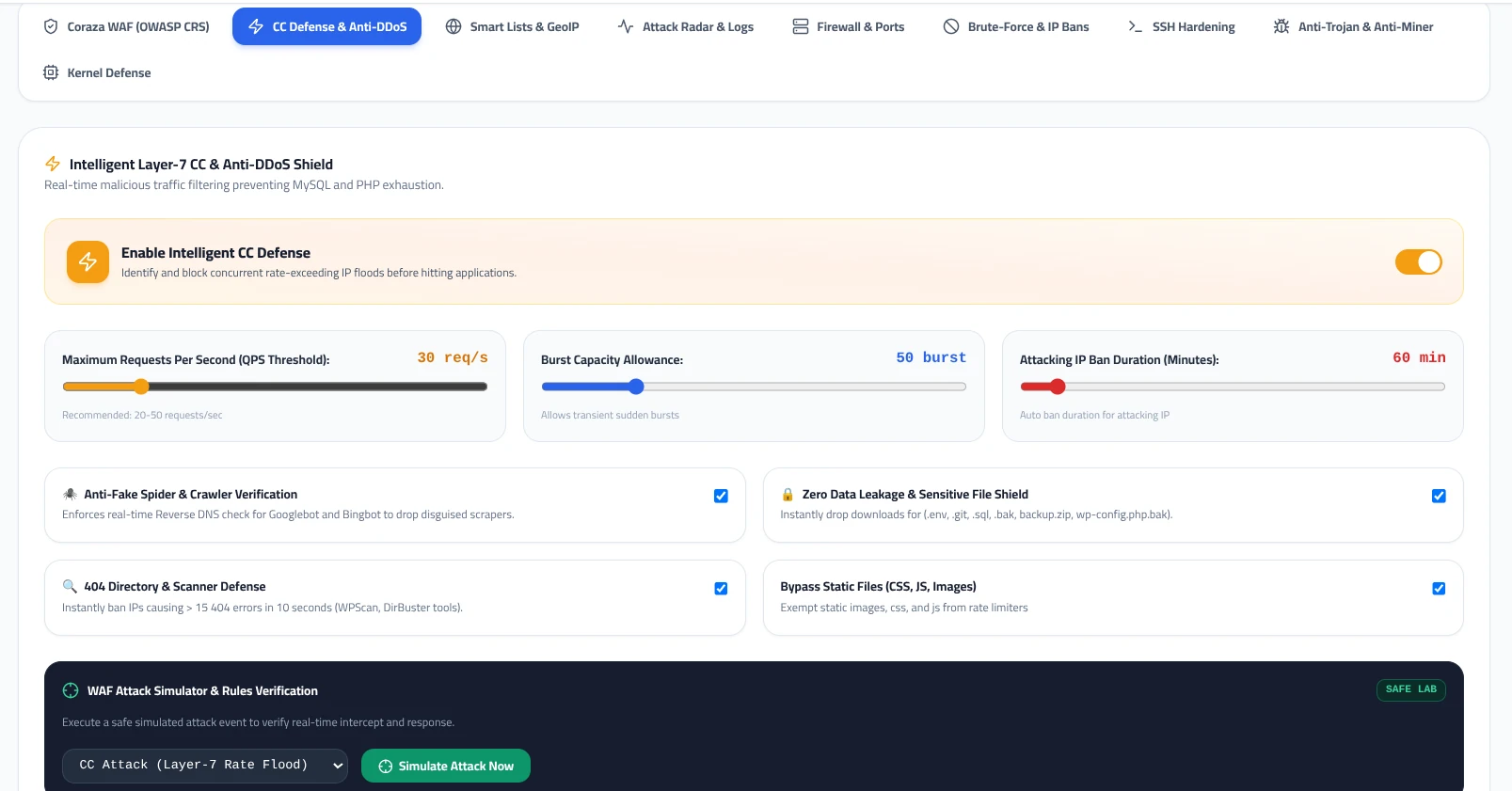
1. Master Switch: Enable Intelligent CC Defense
Activating this toggle enables real-time rate tracking across all inbound client IPs. The proxy engine monitors individual request rates using high-performance in-memory shared tracking zones, preventing database and PHP-FPM starvation without introducing measurable processing latency.
2. Maximum Requests Per Second (QPS Threshold)
Defines the sustained number of HTTP requests a single client IP can dispatch within one second. The default recommended baseline is 30 req/s (typical production baseline: 20–50 req/s). Requests exceeding this rate over a sustained interval trigger an automatic response restriction.
3. Burst Capacity Allowance
Real users occasionally generate rapid bursts of requests when rendering complex web pages containing numerous concurrent assets. Setting the Burst Capacity Allowance (recommended: 50 requests) allows temporary spikes above the base QPS limit without penalizing legitimate visitors.
4. Attacking IP Ban Duration
Specifies the isolation period applied once a client IP violates the configured rate limits. The default setting is 60 minutes. During this isolation window, all inbound requests from the offending IP are immediately dropped at the proxy edge with an HTTP 429 (Too Many Requests) or HTTP 403 status code.
Advanced Behavioral Hardening & Exploit Prevention
Rate limiting alone is not sufficient to counter sophisticated scraping tools and automated reconnaissance engines. MASACP provides four critical toggle modules designed to mitigate automated reconnaissance:
Anti-Fake Spider & Crawler Verification
Scrapers frequently spoof legitimate search engine User-Agents (such as Googlebot or Bingbot) to bypass standard security filters. When enabled, this feature performs automated real-time Reverse DNS lookups (PTR records) and forward lookups against official domains to confirm legitimate bot identity, automatically terminating forged crawlers.
Zero Data Leakage & Sensitive File Shield
Automated botnets constantly scan web applications for exposed configuration files. This module immediately blocks access to sensitive filenames and system directories, including .env, .git, .sql, .bak, backup.zip, and wp-config.php.bak, preventing credential and source code disclosure.
404 Directory & Scanner Defense
Directory brute-forcing tools (such as DirBuster, Gobuster, and WPScan) generate thousands of invalid path queries to detect unlinked admin portals. This shield tracks client 404 status frequencies; if an IP accumulates more than 15 404 responses within a 10-second window, it is instantly blocked.
Bypass Static Files (CSS, JS, Images)
Static media files (such as .css, .js, .png, .jpg, and .svg) consume negligible backend CPU and are typically served directly from disk cache. Enabling this option exempts static file queries from strict QPS limits, significantly reducing false positive triggers for legitimate browsing sessions.
Verifying Defenses with the WAF Attack Simulator
To ensure security rules and rate thresholds operate as expected before facing live attack traffic, MASACP includes an integrated testing framework located at the bottom of the shield settings: WAF Attack Simulator & Rules Verification.
Execution Procedure
- Select an attack pattern from the dropdown menu (e.g., CC Attack (Layer-7 Rate Flood), SQL Injection Attack, or Sensitive File Probing).
- Click the Simulate Attack Now button.
- The internal engine executes a controlled request against your domain loopback and verifies whether the reverse proxy, CC limiter, or Coraza engine successfully intercepted the payload.
- Review the instant validation status and inspect the generated block event in the Forensic Audit Log.
GeoIP Country Filtering & Smart Access Lists
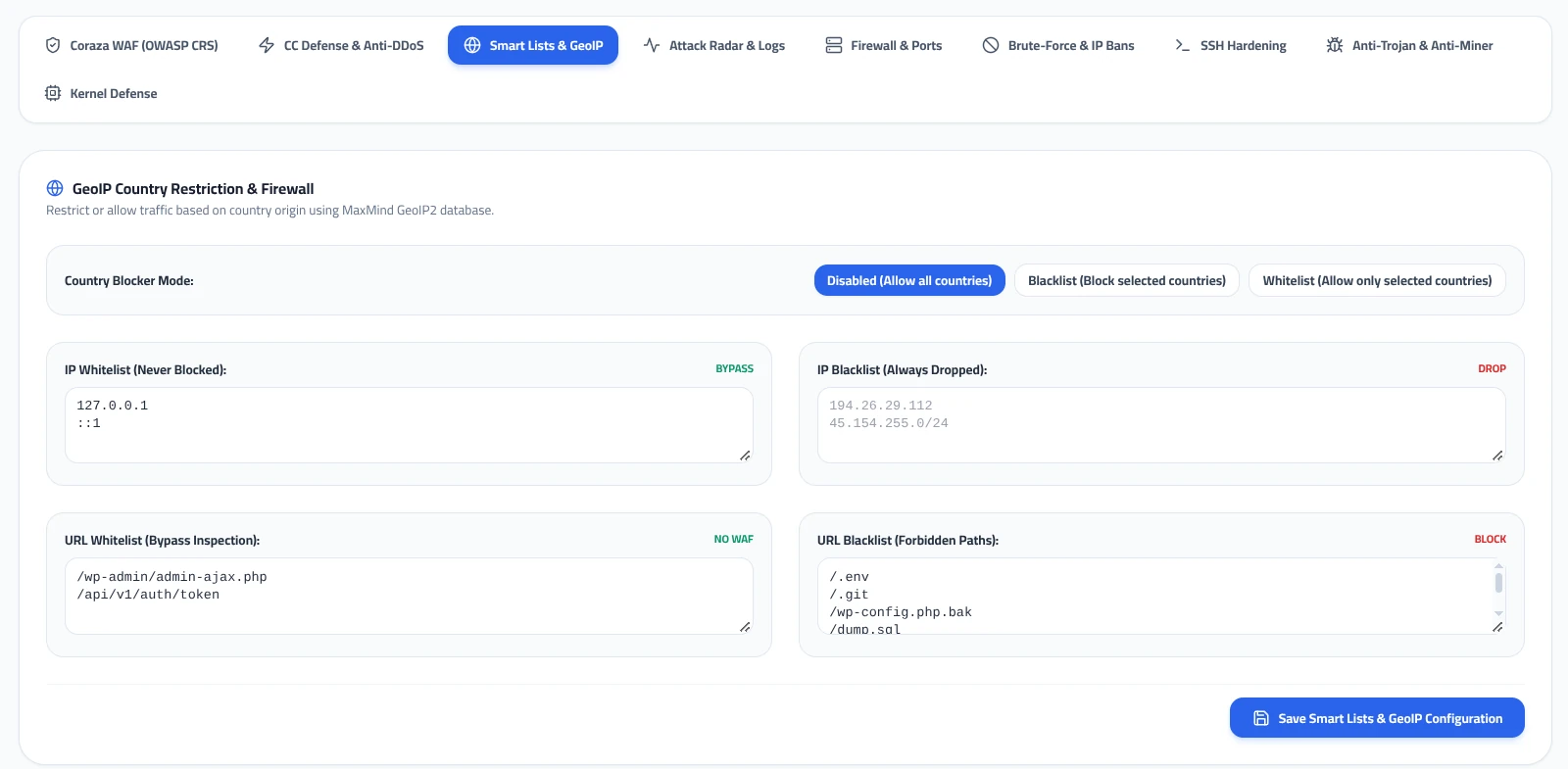
Regional compliance, content rights, and targeted denial-of-service threats often require geographic traffic filtering. Switching to the Smart Lists & GeoIP tab provides granular control over geographic origins, IP subnets, and specific URL endpoints.
GeoIP Country Restriction Modes
Powered by the integrated MaxMind GeoIP2 database, MASACP inspects the client IP origin during the initial TCP handshake. You can operate this firewall in three distinct operational modes:
- Disabled (Allow all countries): All geographic locations are permitted through to the standard inspection pipeline.
- Blacklist (Block selected countries): Inbound connections originating from designated ISO country codes are instantly dropped at the edge. Ideal for mitigating attack campaigns originating from non-target regions.
- Whitelist (Allow only selected countries): Strictly permits visitors originating from specified countries while dropping all other worldwide traffic. Ideal for regional services, local e-commerce stores, or private intranet portals.
Configuring Granular Smart Lists
Below the GeoIP module, four dedicated text fields allow you to define persistent rule overrides without altering core web server configuration files:
| List Category | Action | Example Entries | Primary Operational Use Case |
|---|---|---|---|
| IP Whitelist | BYPASS | 127.0.0.1 ::1 198.51.100.25 |
Trusted corporate offices, external monitoring probes (UptimeRobot, Pingdom), and internal server loopbacks that must never be rate-limited or blocked. |
| IP Blacklist | DROP | 194.26.29.112 45.154.255.0/24 |
Persistent hostile scrapers, known botnet nodes, or entire malicious CIDR network subnets requiring immediate drop actions. |
| URL Whitelist | NO WAF | /wp-admin/admin-ajax.php /api/v1/auth/token |
Endpoints that process high-frequency valid API requests or complex serialized data payloads that may inadvertently trigger CRS false positives. |
| URL Blacklist | BLOCK | /.env /.git /wp-config.php.bak /dump.sql |
Explicit URI patterns that should always yield an immediate HTTP 403 Forbidden without dynamic script evaluation. |
After modifying IP subnets, URL paths, or GeoIP options, click Save Smart Lists & GeoIP Configuration to recompile and apply the security rules without interrupting active web traffic.
Production Deployment Best Practices
1. Coordinate with Upstream CDNs: If your website sits behind an edge CDN (such as Cloudflare or Fastly), ensure the real client IP header (CF-Connecting-IP or X-Forwarded-For) is trusted and parsed by the reverse proxy. Otherwise, the CC limiter may mistakenly identify the CDN’s edge proxy nodes as the attacking source and throttle legitimate traffic.
2. Avoid Overly Strict QPS Limits on Heavy Dynamic Sites: Dynamic single-page applications (SPAs) often trigger multiple background API calls upon initial dashboard load. Setting the QPS threshold below 15 without sufficient burst allowance can cause genuine user interactions to trigger 429 Too Many Requests responses. Keep the burst threshold at 50 or higher for interactive web portals.
3. Routine Review of the Audit Radar: Check the WAF real-time audit logs weekly to identify whether recurring attackers originate from repetitive autonomous system numbers (ASNs) or specific regional blocks, allowing you to refine your IP Blacklist and GeoIP rules accordingly.