Configure high-performance Large Language Models via Google AI Studio and Groq Cloud, run contextual server diagnostics with domain log pinning, generate and refactor code inside Code Studio, and leverage the zero-latency local intelligence engine for log explanations and 1-click IP mitigation.
1. Dual-Tier Intelligence Architecture
The MASACP AI Copilot subsystem is engineered on a dual-tier architecture that balances multi-modal diagnostic reasoning with air-gapped, zero-latency local forensics. Rather than routing all data through external APIs, MASACP separates general infrastructure troubleshooting from real-time log stream inspection:
Cloud Intelligence Tier (LLM Providers)
Integrates directly with Google AI Studio (Gemini) and Groq Cloud (LPU Inference Engines). This tier processes contextual natural language queries, performs deep log cross-referencing, assists in code refactoring within Code Studio, and generates safe Linux remediation commands.
Requires Free API Key
Local Intelligence Tier (Zero-API Engine)
Powered by the built-in MASACP Local Access Intelligence Engine. It operates 100% offline directly within your server kernel and web server memory space. It provides instantaneous microsecond log line decoding, user-agent profiling, and malicious traffic classification without sending a single byte outside the server.
100% Offline & Air-Gapped
Privacy & Credential Sanitization: MASACP implements an automatic log sanitizer prior to dispatching prompts to cloud providers. Database passwords, SSL private keys, environment variables (.env), and session tokens are redacted automatically on the server before transmitting diagnostic context.
2. Configuring AI Providers: Google AI Studio and Groq Cloud
To activate the cloud diagnostic and coding features, navigate to AI Copilot > AI Provider Settings in the primary navigation menu. MASACP natively supports both Google Gemini and Groq Cloud, allowing administrators to switch models depending on speed and token capacity requirements.
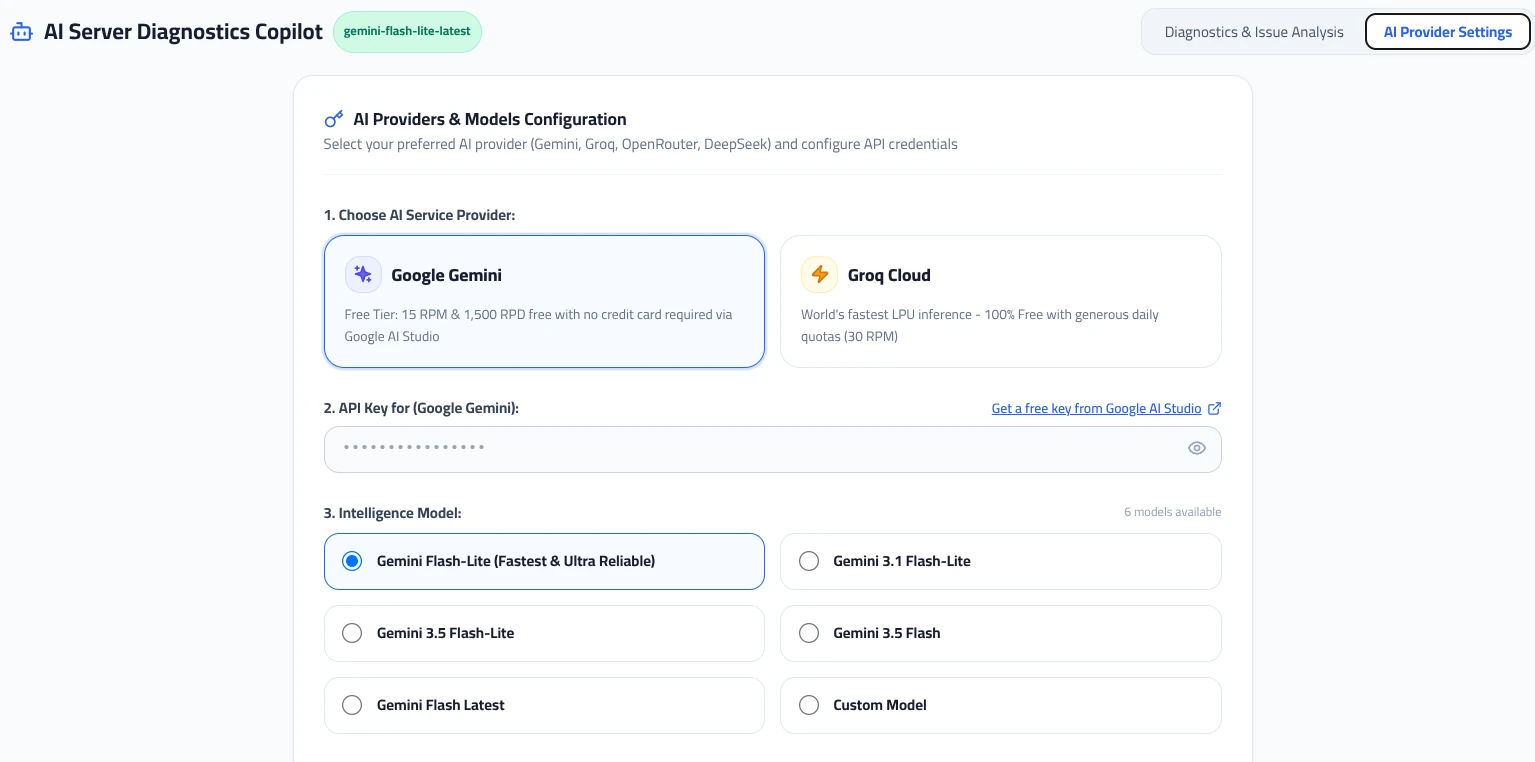
Option A: Connecting Google AI Studio (Gemini)
Google AI Studio provides generous free-tier quotas (15 requests per minute, 1,500 requests per day) without requiring billing card authorization:
- Visit the official Google AI Studio developer console: https://aistudio.google.com/app/apikey.
- Sign in with your Google Workspace or standard account, click Create API Key, and copy the generated token string.
- In the MASACP Control Panel, open AI Provider Settings and select the Google Gemini tab.
- Paste your key into the AI Studio API Key input field.
- Select your preferred model architecture:
- Gemini 2.5 Flash (Recommended): Optimized for rapid diagnostic triage, multi-line log parsing, and server script generation.
- Gemini 2.5 Flash-Lite: Ultra-low latency model engineered for instant question-answering and resource telemetry audits.
- Gemini 1.5 Pro: Extended context window designed for deep historical log forensics and enterprise refactoring tasks.
- Click Save AI Settings. The panel validates the connection instantly.
Option B: Connecting Groq Cloud (Ultra-Fast LPU Inference)
Groq provides deterministic, ultra-high-speed inference powered by Language Processing Units (LPUs), delivering response speeds exceeding 500 tokens per second:
- Access the Groq Console API Management portal: https://console.groq.com/keys.
- Generate a new API Secret Key and copy it to your clipboard.
- In MASACP, select the Groq Cloud tab inside AI Provider Settings.
- Input the Groq API key and choose from the supported open-weight models:
- Llama 3.3 70B Versatile: Flagship performance for complex diagnostic debugging and multi-step bash command formulation.
- Llama 3.1 8B Instant: Near-instantaneous response times for routine server configuration queries.
- Mixtral 8x7b 32k: Specialized mixture-of-experts model capable of processing massive log extracts.
- Save your changes to establish active credentials.
| Feature / Parameter | Google AI Studio (Gemini) | Groq Cloud (LPU) |
|---|---|---|
| Direct Portal URL | https://aistudio.google.com/app/apikey |
https://console.groq.com/keys |
| Primary Advantage | Massive context window & multi-modal reasoning | Sub-second inference speed (500+ tokens/sec) |
| Default Model | Gemini 2.5 Flash | Llama 3.3 70B Versatile |
| Billing Requirement | Free tier available without credit card | Free developer tier available |
3. AI Diagnostics & Issue Analysis Console
The Diagnostics Chat interface acts as an autonomous Systems Engineer directly linked to your server telemetry. It can cross-reference web server virtual host declarations, Multi-PHP FPM sockets, database error buffers, and Linux kernel cgroups in real time.
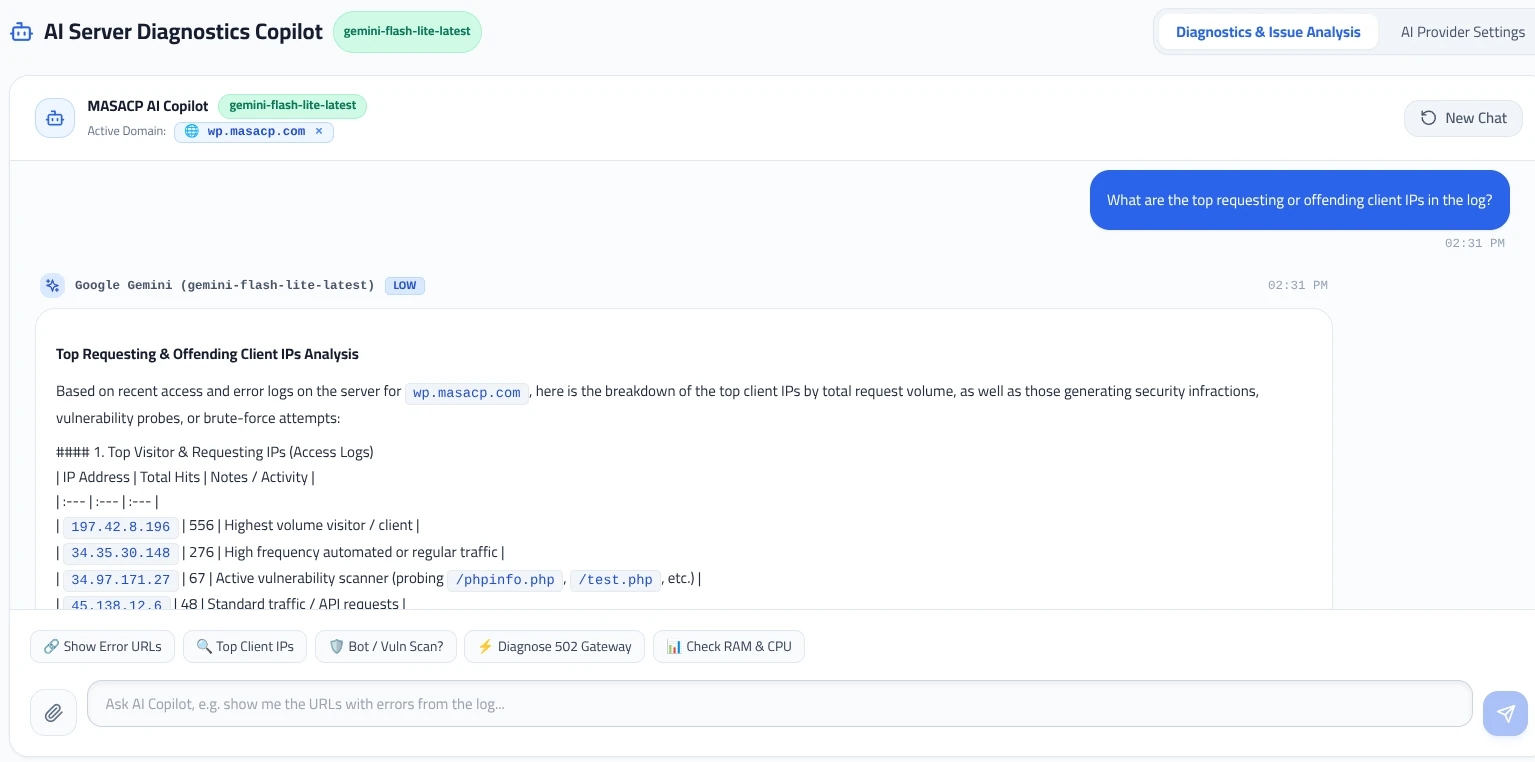
Contextual Domain Pinning
In the top toolbar of the AI Diagnostics screen, administrators can select the Active Domain (e.g., wp.masacp.com). Pinning an active domain automatically injects the following context into the diagnostic prompt pipeline:
- The domain’s specific Nginx / OpenResty virtual host configuration block.
- The dedicated PHP-FPM pool socket status and error backlog (e.g.,
/var/run/php/php8.2-fpm-wp.sock). - The recent 200 lines from
/home/{user}/logs/nginx_error.logandaccess.log. - Live tenant cgroup metrics (CPU throttling percentage, memory RSS vs. swap utilization).
One-Click Quick Diagnostic Prompts
MASACP features built-in prompt acceleration pills positioned directly above the chat input:
Extracts 4xx and 5xx endpoints from access logs, grouping them by status frequency and referrer.
Calculates request density per remote address, evaluates user-agent legitimacy, and identifies crawlers.
Scans access patterns for typical exploitation attempts (e.g., wp-login.php brute-force, .env probing).
Inspects PHP-FPM worker exhaustion, execution timeouts (max_execution_time), and upstream proxy sockets.
Analyzes top CPU/memory consuming processes and determines if system swapping is degrading response latency.
Using the paperclip icon, attach specific files such as MySQL slow logs, Redis logs, or custom bash output.
4. Safe Automated Remediation with Human-in-the-Loop Approval
When resolving critical service disruptions (such as 502 Bad Gateway, database connection failures, or PHP memory exhaustion), MASACP enforces strict safety boundaries through a Human-in-the-Loop execution model:
Automated Root Cause Discovery
The AI Copilot inspects upstream service logs, identifying exact causes such as upstream sent too big header while reading response header from upstream or pm.max_children reached.
Proposed Fix Card Generation
Instead of executing commands blindly in the background, the assistant renders an explicit Proposed Fix Card within the chat dialog. The card displays the exact command string (e.g., adjusting fastcgi_buffers in Nginx or increasing PHP-FPM memory_limit) and states the expected impact.
1-Click Execution & Configuration Reload
Upon reviewing the proposal, the administrator clicks Apply Fix. The MASACP daemon executes the adjustment within the tenant container, runs a non-destructive configuration syntax test (e.g., nginx -t), reloads the daemon cleanly, and verifies service restoration.
Execution Safeguard: Destructive commands (such as rm -rf, dropping database schemas without backups, or altering firewall root chains) are blocked by MASACP’s backend validation layer, regardless of the AI model’s output.
5. AI Copilot in MASACP Code Studio
Developers managing application source code inside the built-in MASACP Code Studio (Web Code Editor) can access the AI Copilot directly from the editor toolbar. This removes the need to switch external tabs or copy sensitive code across third-party web apps.
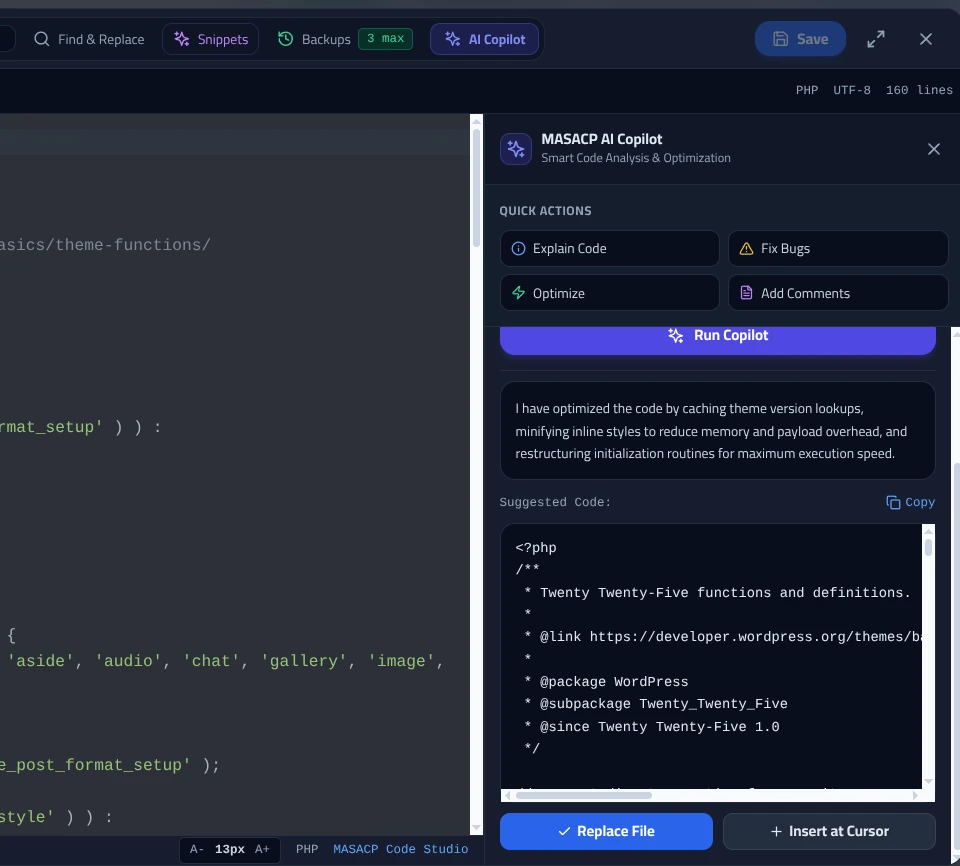
Quick Actions and Interactive Coding
Clicking the AI Copilot button in the editor header slides out the AI assistance drawer. When text or code is highlighted inside the editor, the assistant automatically focuses on that specific block; otherwise, it references the entire open file:
- Explain Code: Provides a step-by-step breakdown of algorithms, complex SQL joins, or regular expressions.
- Fix Bugs: Identifies syntax errors, unhandled exceptions, logical bugs, and deprecated language functions.
- Optimize: Refactors loops, reduces redundant memory allocations, and optimizes database queries for improved throughput.
- Add Comments: Injects clean, standardized docstrings (PHPDoc, JSDoc, Python docstrings) throughout the codebase.
Custom Instructions and Seamless Insertion
Administrators can enter free-form developer instructions into the prompt field, such as:
Once the model generates the revised snippet, Code Studio presents three direct application buttons:
- Replace File / Selection: Swaps the active editor selection or the whole file with the refined code block.
- Insert at Cursor: Places the generated function or logic block at the current cursor coordinates.
- Copy Code: Transfers the result to your clipboard for external validation or manual review.
6. Inline Log Line Forensics and 1-Click WAF Banning
Monitoring access and error logs in real time often requires deciphering dense Nginx combined log formatting. MASACP streamlines this by placing an on-demand inspection utility directly into the Logs Center table.
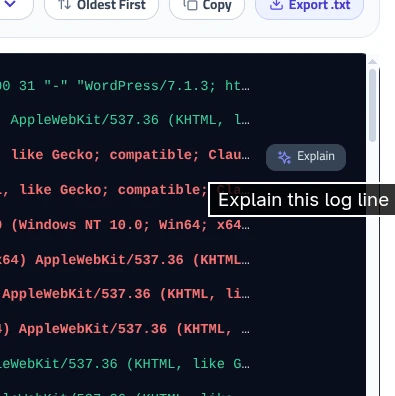
The Local Access Intelligence Engine (100% Offline)
Hovering over any line in the access log reveals an Explain button. Clicking this triggers the Access Log Line Explanation modal, operated entirely by the built-in offline engine. Because this engine does not depend on external AI APIs, it executes instantaneously without token costs or privacy exposure.
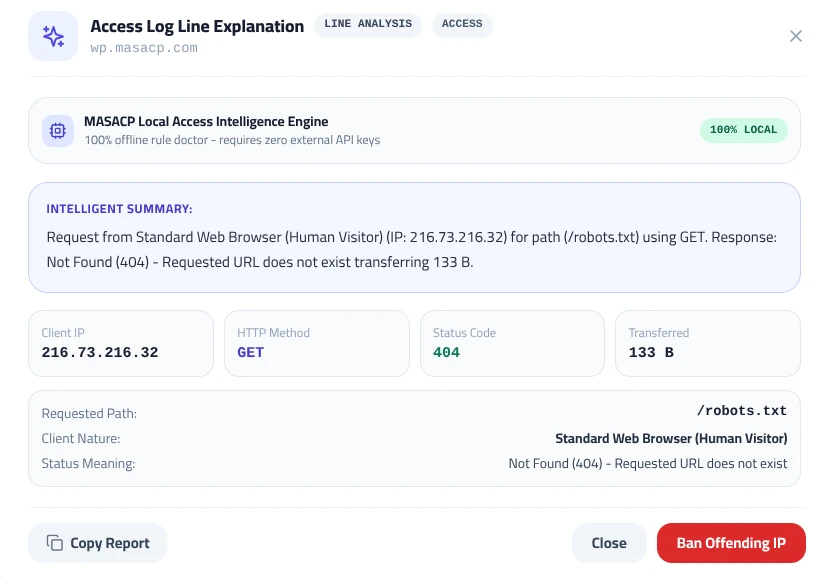
Modal Forensic Breakdown
The modal translates complex raw server logs into structured, actionable intelligence:
Explains in plain English what the client attempted to do, whether the request succeeded or failed, and whether the URI path represents a known vulnerability scan (e.g., probing for /wp-content/plugins/revslider/ or /.git/config).
Differentiates legitimate human desktop/mobile traffic from automated scripts, search indexers (Googlebot, Bingbot), or malicious scanning tools (sqlmap, Nikto, Go-http-client).
Provides pill badges for Client IP, HTTP Method (GET, POST, HEAD), Response Status Code (200, 301, 403, 404, 500), and payload byte volume.
Includes an immediate Ban Offending IP action button that pushes the remote address directly into MASACP’s kernel-level firewall and WAF blocklist.
Instant Threat Neutralization: Clicking Ban Offending IP executes an atomic iptables/nftables drop rule and updates the Nginx deny directives across all virtual hosts. Subsequent connection attempts from that remote IP are rejected at the TCP handshake level with zero CPU overhead.
7. Operational Checklist & Best Practices
- Rotate API Credentials Regularly: While MASACP encrypts API keys on disk using system-level salts, rotating keys biannually via Google AI Studio and Groq Console maintains optimal security hygiene.
- Pin Domains for Precise Diagnostics: Always select the relevant website in the Active Domain dropdown prior to querying 502 or 404 issues. This ensures the model receives isolated virtual host context rather than generic server configurations.
- Review Diff Previews in Code Studio: Prior to clicking Replace File, review the proposed code differences to ensure project-specific constants and configuration flags are preserved.
- Use Offline Forensics for Confidential Logs: If inspecting proprietary log streams containing private intranet IP ranges or sensitive internal URLs, utilize the hover Explain tool in Logs Center to ensure 100% offline analysis.