A comprehensive guide to managing recurring background automation in MASACP, utilizing 14 enterprise task templates, configuring visual time schedules, and running sandboxed commands with overlap protection.
Enterprise Task Automation with Zero-Trust Security
Automated background tasks (Cron jobs) are indispensable for modern web hosting operations. From renewing SSL certificates and purging expired cache files to executing framework schedulers (such as Laravel Artisan or WordPress WP-Cron), scheduled execution ensures systems stay updated and performant without human intervention.
Traditional Linux crontab configurations present significant security and operational risks: commands often run with uncontrolled permissions, overlapping jobs can exhaust server memory, and syntax errors can silently break production workflows. MASACP replaces error-prone crontabs with a structured, zero-trust scheduling engine featuring POSIX tenant isolation, automated timeout enforcement, concurrency overlap locks, and intuitive visual timing builders.
The Cron Jobs Telemetry Dashboard
To open the task automation interface, select Cron Jobs from the main navigation menu. The console displays real-time operational status across all background processes.

Live Telemetry Metrics
All registered system & site tasks
Currently eligible for scheduling
Currently active processes
Last execution yielded non-zero code
Pre-Built Enterprise Task Templates
To streamline recurring administrative tasks, MASACP includes 14 pre-tested, industry-standard templates. Clicking Use Template automatically populates the required command syntax, execution scope, and optimal scheduling cadence.
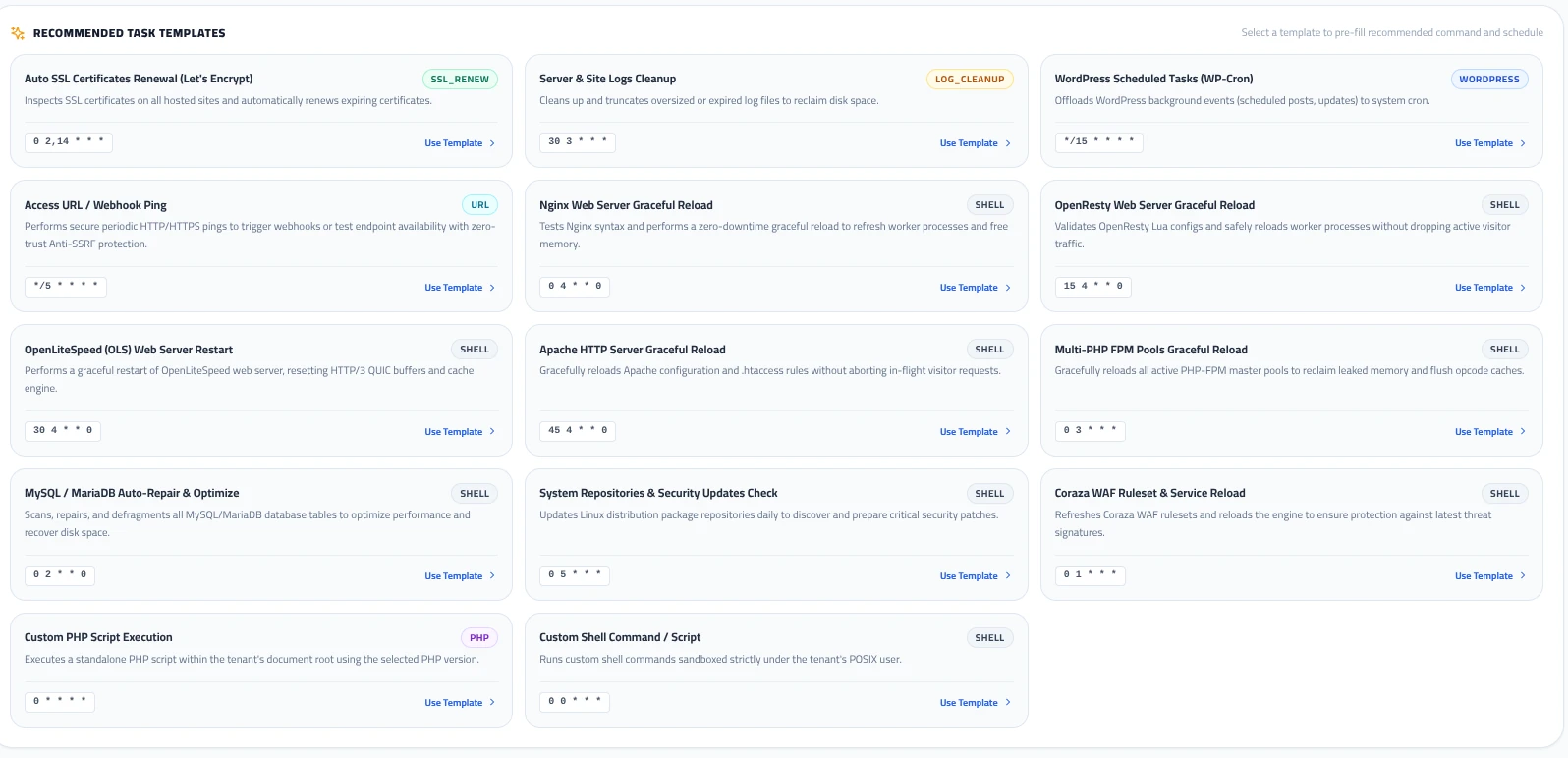
| Template Name | Type | Default Cadence | Operational Purpose |
|---|---|---|---|
| Auto SSL Certificates Renewal | SSL_RENEW | 0 2,14 * * * | Checks expiring Let’s Encrypt certificates twice daily and auto-renews before expiration. |
| Server & Site Logs Cleanup | LOG_CLEANUP | 30 3 * * * | Truncates oversized application logs and rotates system records to prevent disk exhaustion. |
| WordPress Scheduled Tasks (WP-Cron) | WORDPRESS | */15 * * * * | Offloads WordPress background events (scheduled posts, WooCommerce tasks) to system cron. |
| Access URL / Webhook Ping | URL | */5 * * * * | Dispatches outbound HTTP/HTTPS requests with built-in Anti-SSRF private IP blocking. |
| Nginx / OpenResty Graceful Reload | SHELL | 0 4 * * 0 | Performs a syntax check and zero-downtime worker process recycle to free allocated memory. |
| OpenLiteSpeed (OLS) Web Server Restart | SHELL | 30 4 * * 0 | Flushes HTTP/3 QUIC connection states and clears runtime opcode caches. |
| Multi-PHP FPM Pools Graceful Reload | SHELL | 0 3 * * * | Recycles active PHP-FPM master processes across all installed versions to reclaim leaked memory. |
| MySQL / MariaDB Auto-Repair & Optimize | SHELL | 0 2 * * 0 | Scans, defragments, and optimizes database indexes to maximize SQL query performance. |
| Coraza WAF Ruleset & Service Reload | SHELL | 0 1 * * * | Updates OWASP Core Rule Set definitions and reloads firewall filters seamlessly. |
Creating a Custom Cron Job with the Visual Schedule Builder
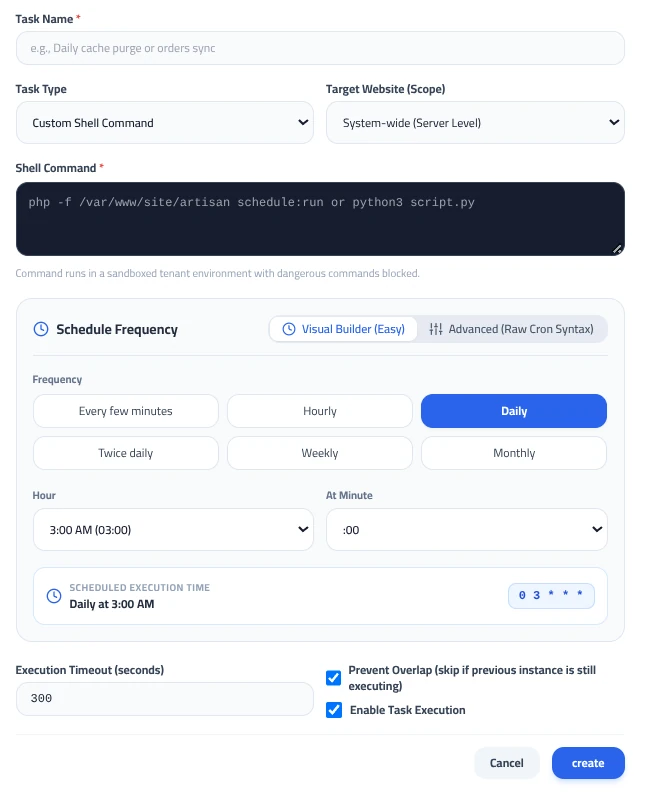
To create a custom task, click the + New Cron Job button in the top header. The creation modal opens with extensive configuration options:
1. Scope and Execution Target
- Task Name: A descriptive identifier (e.g., Daily Cache Purge or Order Queue Sync).
- Task Type: Choose between Custom Shell Command, Run PHP Script, Access URL, or maintenance routines.
- Target Website (Scope): Select whether the task operates at the System-wide (Server Level) or strictly inside a specific tenant’s website document root.
- Command Input: Enter the executable script (e.g.,
php -f /var/www/site/artisan schedule:run). For standard tenants, commands are executed strictly under their isolated POSIX user account; dangerous system calls (such as raw root disk formatters or kernel alterations) are automatically blocked.
2. Visual Schedule Builder (No Cron Syntax Required)
Instead of manually calculating 5-field cron strings (* * * * *), MASACP provides an interactive Visual Builder (Easy):
Selecting a frequency displays tailored dropdown menus (such as Hour: 3:00 AM and At Minute: :00). The interface automatically renders a human-readable confirmation (Daily at 3:00 AM) alongside the standard cron expression (0 3 * * *).
Advanced system engineers can toggle to Advanced (Raw Cron Syntax) to input custom 5-field expressions directly.
3. Execution Governance & Concurrency Control
Execution Timeout (seconds)
Sets a strict execution ceiling (default: 300 seconds). If an unoptimized query or stuck remote API call hangs the script, MASACP terminates the process automatically, preventing thread starvation.
Prevent Overlap Protection
Enabling this checkbox places a non-blocking advisory file lock on the task. If a previous run is still processing when the next interval arrives, the engine safely skips the secondary run instead of spawning duplicate processes that could corrupt databases or exhaust RAM.
Best Practices for Scheduled Automation
1. Offset Heavy Tasks: Avoid scheduling multiple maintenance routines at exact midnight (00:00). Distribute database optimization, backups, and log truncations across low-traffic windows (e.g., 2:00 AM, 3:30 AM, 4:15 AM) to balance disk I/O.
2. Use WP-Cron Offloading for Busy Websites: WordPress’s default wp-cron triggers upon visitor page loads, which adds latency to client requests. Disabling default WP-Cron in wp-config.php and using the MASACP WordPress Scheduled Tasks template ensures timely queue processing with zero impact on visitor response times.
3. Always Enforce Overlap Locks on Queue Workers: Any job processing email queues, payment reconciliations, or large data imports must have Prevent Overlap checked to prevent duplicate processing.