Master full server and granular application backups, configure zero-disk cloud streaming, establish automated retention policies, and execute 1-click restorations in MASACP.
1. Backups Dashboard and Capacity Telemetry
The MASACP Backups management hub provides a unified overview of all local and off-site archive repositories. Administrators can instantly evaluate storage consumption, active multi-cloud endpoints, and scheduled task health from a central control strip.
The dashboard displays four real-time metric indicators:
- Total Backups: The collective count of all stored archive packages (full server, isolated websites, and database dumps).
- Backup Storage Used: The cumulative disk footprint consumed across local and attached storage volumes.
- Active Destinations: The number of verified storage providers currently available for automated sync (Local, Google Drive, Dropbox, SFTP).
- Active Schedules: The count of active cron-based recurring backup jobs running on the server daemon.

2. Creating Instant Manual Backup Snapshots
Before performing server upgrades, database migrations, or major plugin updates, administrators should generate an immediate snapshot. Clicking the green + Create Backup Now button opens the snapshot wizard.
The creation wizard offers flexible scope segmentation to suit diverse workloads:
- Specific Website + Database Combo (Recommended for CMS): Packages a targeted website’s document root alongside its associated SQL database (ideal for WordPress, WooCommerce, and Magento).
- Full Server (All Sites + Databases): Generates an exhaustive snapshot encompassing all tenant domains, databases, and vhost configurations.
- Websites Files Only: Backs up filesystem assets without triggering MySQL database dump routines.
- Databases Only (SQL): Dumps and compresses all MySQL/MariaDB databases into compact
.sql.gzarchives. - Custom Selection: Provides granular multi-select checkboxes to tailor exact inclusion lists.
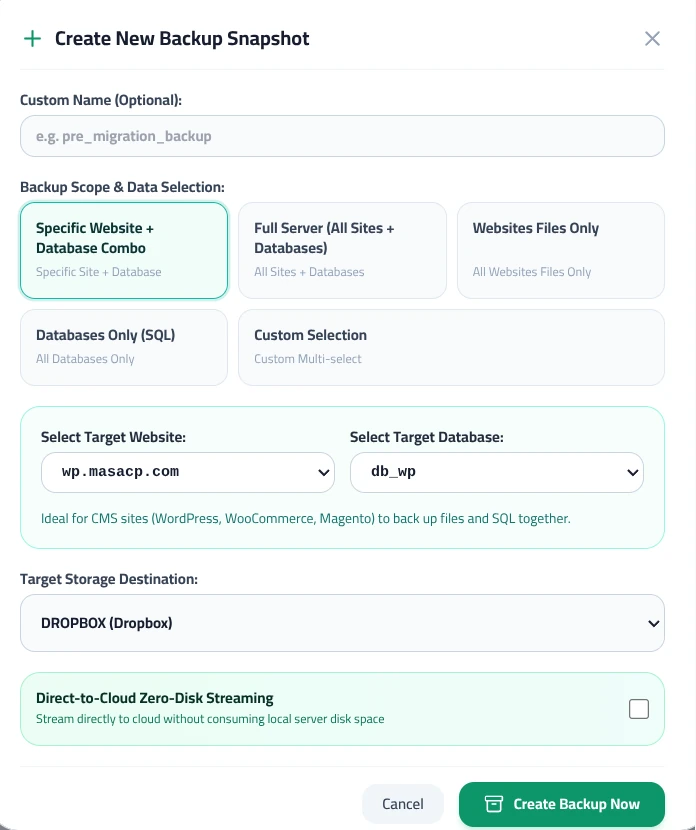
When backing up large environments with constrained local server disk space, enable the Direct-to-Cloud Zero-Disk Streaming toggle.
Instead of staging multi-gigabyte tarballs in /tmp before uploading, MASACP streams compressed chunks directly to the selected cloud destination (such as Dropbox or Google Drive) through UNIX pipes, ensuring zero risk of filling the local root partition.
3. Configuring Automated Backup Schedules and Retention
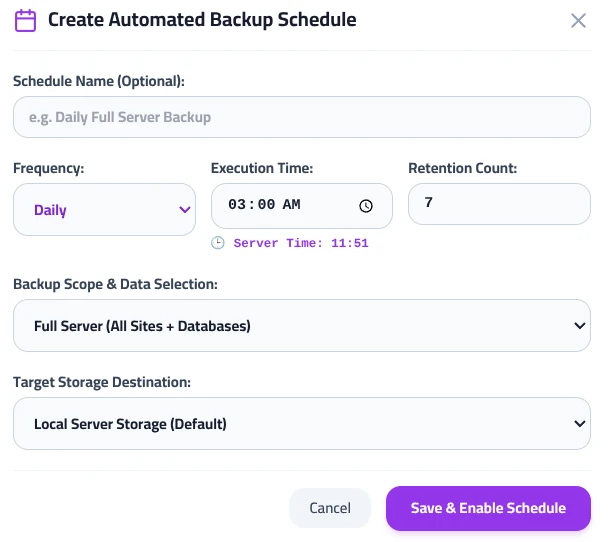
Automating recurring backups guarantees continuous disaster preparedness without administrative overhead. Clicking Backup Schedules launches the schedule configuration wizard:
- Schedule Name: Specify a descriptive label (for example,
Daily Full Server Backup). - Frequency: Select between
Daily,Weekly,Monthly, or custom intervals. - Execution Time: Set the exact run time (e.g.
03:00 AM). To prevent performance degradation during business hours, always schedule jobs during off-peak traffic periods relative to your displayed Server Time. - Retention Count: Define the maximum number of archives to preserve (for example,
7). MASACP’s cleanup daemon automatically removes the oldest archive when a new snapshot succeeds, keeping storage consumption within budget. - Backup Scope & Destination: Choose the target data scope and route archives to local storage or an off-site cloud provider.
4. Managing Available Backups and 1-Click Restorations
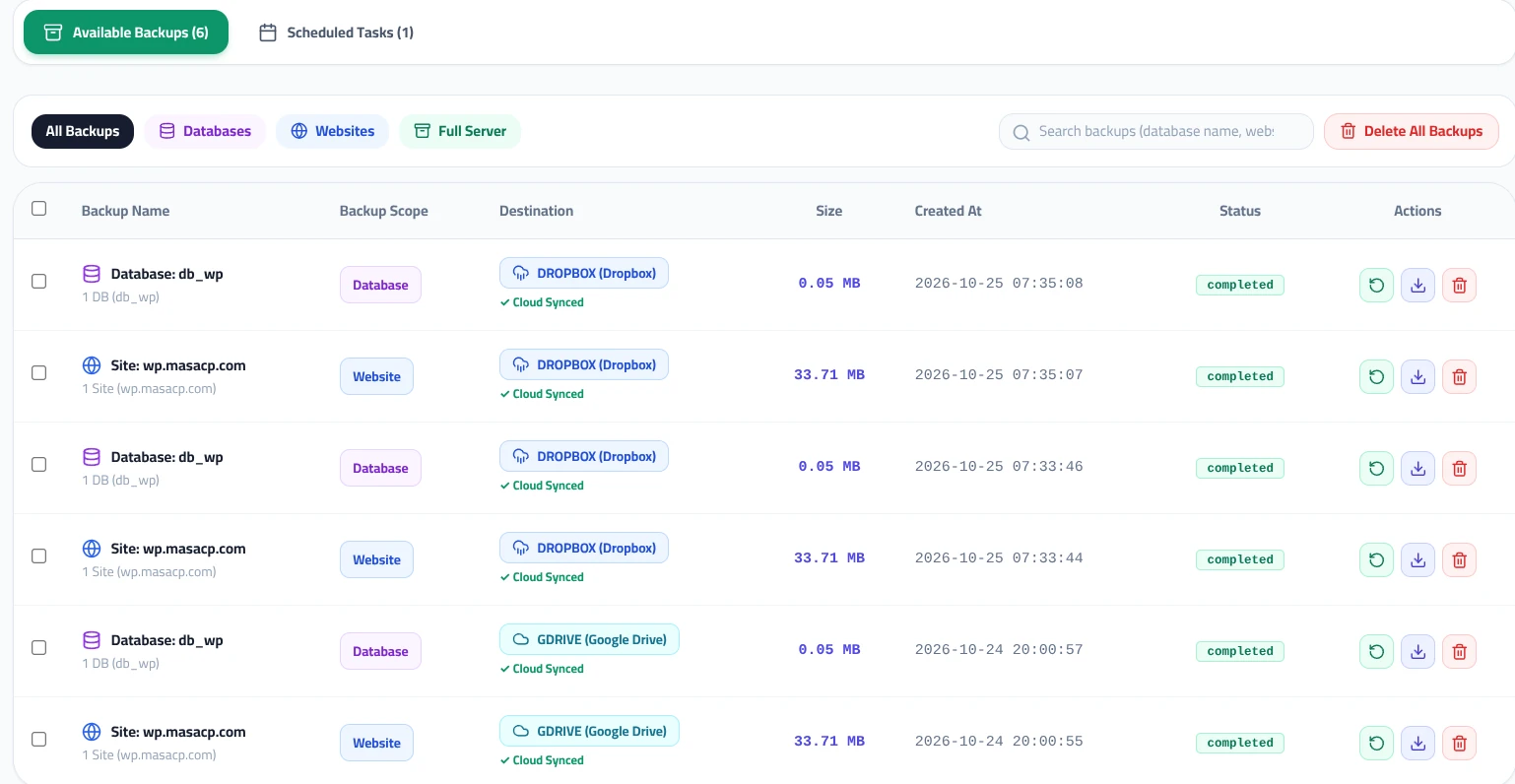
Under the Available Backups tab, MASACP catalogs all historical archives. Fast filter pills (All Backups, Databases, Websites, Full Server) and an integrated search box allow administrators to locate specific recovery points in seconds.
The repository table details critical archive metadata:
- Backup Name & Scope: Explicitly labels whether the archive is a database dump (e.g.
Database: db_wp) or a website virtual host tarball (e.g.Site: wp.masacp.com). - Destination & Sync Status: Displays the storage provider badge alongside a green
✓ Cloud Syncedstatus tag verifying remote delivery. - Size & Creation Timestamp: Shows exact archive file size and generation timestamp.
- Operational Actions:
- Restore (Green circular arrow): Triggers 1-click automated restoration, replacing existing files or SQL tables with the archived state.
- Download (Purple arrow): Downloads the archive directly to your workstation for local safekeeping.
- Delete (Red trash can): Permanently purges the archive from both local and remote cloud repositories.
5. Scheduled Tasks Monitoring and On-Demand Triggers
Switching to the Scheduled Tasks tab displays all active automated backup routines configured on the system.
Administrators can inspect execution parameters and exercise granular control over cron routines:
- Frequency & Time: Details interval settings and scheduled execution clocks (e.g.
Daily 03:00). - Scope & Destination: Highlights the payload scope (e.g.
Full Server) and target storage node (e.g.Local Server Storage). - Retention Quota: Confirms the rolling archive count (e.g.
Keep 7). - Run Now Action: Allows immediate on-demand execution of the schedule without waiting for the scheduled cron window or altering schedule parameters.
- Edit & Delete: Enables real-time updates to frequencies, target destinations, or complete schedule decommissioning.

Combining instant snapshots, isolated cloud destinations, and intelligent rolling retention policies equips your MASACP server with enterprise-grade resilience and zero data loss assurance.